Data Overwritten After Deletion or Formatting
Once new data is written to sectors or flash pages that held the old content, recovery changes from finding lost metadata to determining which original extents physically survived.
Data overwritten: what should you do next?
Answer one question about the current state. The result suggests the safer next step rather than diagnosing the failure.
Has writing to the device stopped since the deletion, formatting or reinstall?
Assess from a preserved copy.
Image the device, then compare surviving metadata with actual content to identify which extents still hold recoverable data. A recovered filename does not prove the content survived.
Stop further writes immediately.
Each additional write can consume another old extent. Do not install recovery software onto the affected volume or save recovered files back to it.
This guide classifies the next recovery action from observable information. It does not diagnose hardware condition or estimate a percentage chance of recovery.
What “overwritten” actually means
Deletion and quick formatting usually change metadata first; overwrite is the later event where new writes reuse addresses that belonged to old files. On magnetic disks, sectors containing new data no longer contain the previous user data in a form normal data recovery can read. On SSDs, TRIM and the flash translation layer add another mechanism: old logical addresses may stop returning previous contents even before they are reused by new files. It helps to keep complete overwrite, partial overwrite, metadata-only overwrite and TRIM/deallocation separate in your head — each leaves a different, specific trace rather than one generic “gone.”
Overwrite is spatial, not a percentage
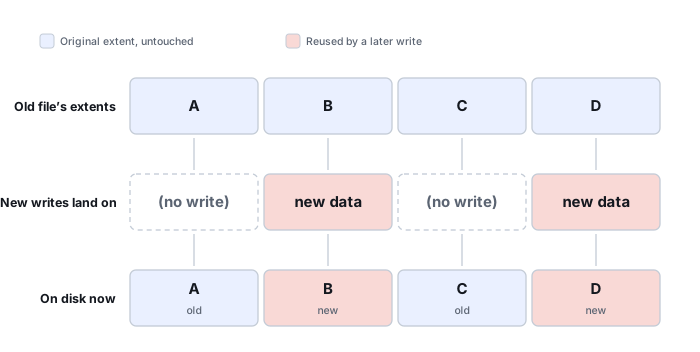
A few gigabytes written after a deletion do not destroy some fixed percentage of every deleted file evenly — overwrite is spatial: it lands on specific extents, and which ones matters far more than how many bytes were written in total. The diagram above shows this for one file with four extents, A through D: later writes happen to land on B and D, so reading that file's data today returns A's and C's original content but B's and D's newer content. The file's own metadata can still describe all four extents perfectly, with a correct name and the correct total size — while what those extents actually contain now is a mix of two different points in time.
A surviving file record can describe the old layout correctly while some of the referenced extents now contain newer data. That's why a recovered file with the right name and the right size can still open as garbled, truncated or structurally invalid — the metadata survived intact; part of the payload didn't.
Damage from a partial overwrite also depends on which extents were reused: small files, fragmented files and metadata structures can all be affected differently by the exact same set of new writes. An OS reinstall is a particularly aggressive case because it creates many files, logs, updates, caches and temporary writes spread across the target volume — see Data Lost to an OS Reinstall for how that plays out as a sequence rather than one event.
How to assess the situation
Stop writes and preserve the current state. Record what happened after the loss: how much data was copied, whether an OS was installed, whether applications continued running, and whether the device is an HDD or SSD. Recovery from an image can then compare surviving metadata with actual content and identify files whose extents still contain plausible data.
What recovery software can and cannot do
Software can find old file records, locate surviving extents and carve recognizable content. It cannot reverse a genuine sector overwrite. A recovered filename therefore does not prove the associated data survived. Partial overwrite is a common source of files that recover with a plausible name, a correct size and even a valid-looking header, yet still fail structural validation deeper inside — see Recovered Files Won't Open for how to work through that pattern once a file has been extracted. For partially overwritten structured files, format-specific repair may salvage intact internal objects, but that is reconstruction from surviving content, not recovery of the overwritten bytes.
Why preserving evidence matters
Do not install recovery software onto the affected volume or save recovered files back to it. Each new write can consume another old extent. If a previous recovery attempt already wrote to the source, keep a record of what was done; it helps explain why some files validate and others do not.
Do not save recovered files, install software, create partitions, format, initialize or run write-capable repair tools on the only copy of the affected data. When practical, work from a verified image or another preserved copy.
For the full technical treatment of what a write actually replaces, see What Overwrite Actually Destroys; for how to check a recovered file beyond its name and size, see Validating Recovered Data and Recovered Files Won't Open. This page covers the overwrite event itself, arrived at from Accidental Deletion, Accidental Formatting or Data Lost to an OS Reinstall · Recovering Encrypted Wallet Files and Keystores.
This page describes the general situation, not a guaranteed fix for a specific case. If the source is unstable or the data is irreplaceable, consider a professional evaluation before further attempts.