Why Deleted Files Usually Can't Be Recovered on an SSD
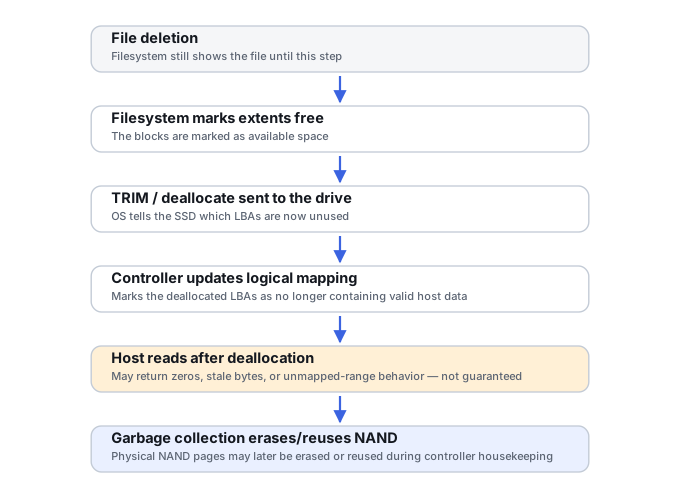
Undeleting a file on an SSD is fundamentally less predictable than undeleting one on a hard drive. TRIM can cause the SSD to stop returning the old data through its normal logical interface, and later internal garbage collection may physically erase the underlying flash pages.
Deleted SSD files: what should you do next?
Answer one question about the current state. The result suggests the safer next step rather than diagnosing the failure.
Could TRIM/deallocation have been issued through the OS, file system and storage path after deletion?
Ordinary undelete may no longer see deallocated blocks.
Stop writes and avoid assuming that immediate physical flash erase is required for recovery to fail. What matters first is whether the logical interface still exposes the old data.
Preserve the current state and test recovery.
If deallocation was not propagated, metadata- or content-based recovery may still be possible. Recover to separate storage.
This guide classifies the next recovery action from observable information. It does not diagnose hardware condition or estimate a percentage chance of recovery.
What's actually happening
On a hard drive, deletion normally marks file-system space as available while the old sectors remain readable until they are overwritten. On a TRIM-capable SSD, the operating system may also issue a TRIM/deallocate command for logical blocks that are no longer needed. What happens next is controller- and interface-dependent: the SSD may stop exposing the previous contents immediately, may return zeros or other deterministic data for trimmed ranges, and may physically erase the corresponding flash later during garbage collection. The timing is not reliably predictable from outside the drive.
How recoverable this really is
Once a trimmed range no longer returns its previous contents through the SSD's normal logical interface, ordinary undelete software cannot recover those old blocks. If the controller has also erased the underlying flash, recovery becomes harder still. The important question is whether TRIM/deallocation was issued and propagated through the actual storage stack. USB bridges, RAID layers, virtualization, operating-system settings, file systems, and drive firmware can all affect that behavior, so apparently similar SSD deletion cases can have very different outcomes.
What changes the outcome
TRIM is not simply an SSD feature that is either “on” or “off.” Recovery depends on the whole path between the file system and the flash. The operating system must identify blocks as no longer needed, the command must pass through the storage driver and any USB, RAID or virtualization layer, and the SSD firmware must decide how reads from those logical addresses are handled. A drive that supports TRIM therefore does not prove that a particular deleted file has already become unrecoverable.
What you can check safely
Record the exact device model, connection path, operating system, file system and whether the SSD was internal, behind USB, part of RAID or exposed to a virtual machine. Note whether the computer remained powered on after deletion and whether large updates, downloads or other writes followed. On Windows, fsutil behavior query DisableDeleteNotify can show whether the system is configured to send TRIM notifications at all — that's a useful diagnostic clue about the storage stack's general behavior, not proof of what happened to one particular deleted file; a system configured to send TRIM can still have a case where it didn't reach a specific file in time, and vice versa. These facts are more useful than repeatedly scanning the SSD. If a read-only image already exists, recovery tools can be tested against the image without continuing to exercise the original device.
Why a scan result can be misleading
A recovery program may still find a deleted filename and metadata even when the data blocks referenced by that record have been deallocated. The opposite can also occur: TRIM may not have reached the device, leaving old content readable even though the storage stack normally supports it. A promising directory tree is therefore not proof that file content survives; recovered files must be opened and validated.
The general approach
Stop using the affected storage as soon as practical, but don't assume there is a universal seconds-long countdown or keep booting the same system just to test recovery tools. It's just as important to check other copies — a cloud sync trash bin, a backup, a shared copy on another device — since those are frequently the faster and more reliable path once TRIM is even a possibility.
Deallocation and physical erasure are separate events
TRIM/deallocate and the actual physical erase of NAND are two different things that happen at two different times. Deallocation tells the controller that a logical range no longer needs to be preserved; garbage collection is the separate, later background process that copies out any still-valid data nearby, updates its mapping, and only then erases the underlying physical block. Data marked invalid by deallocation can still physically exist on the flash for a period before that erase actually happens. See TRIM, Deallocate and Garbage Collection for the full mechanics.
Read-after-deallocate is what ordinary recovery sees
Once the controller has processed a deallocate command, the host may simply stop receiving the previous contents of that range through the normal read interface — reads can return zeros or other controller-defined content. Recovery software working through that same standard interface only ever sees the controller's current answer; if trimmed ranges already read back as zeros, there is nothing "deeper" an ordinary undelete tool can reach through that path.
Garbage collection changes the NAND later
Because garbage collection is scheduled by firmware, workload, idle time and power state rather than a fixed clock, no externally observable countdown reliably predicts when a specific trimmed range gets physically erased. That cuts both ways: it means a device can sometimes retain physical remnants longer than intuition suggests, and it means there is no safe universal number of seconds to rely on either way.
Chip-off does not automatically defeat TRIM
Even where physical remnants of deallocated data genuinely survive in NAND, turning them back into a usable file still requires identifying which pages belong to which logical generation, reversing any scrambling, correcting ECC, and reconstructing enough of the translation layer to know which page is which — the same reconstruction problem covered in Chip-Off, ISP and Monolithic Flash Recovery. Physical remanence and practical recoverability are not the same question, and chip-off is not a reliable shortcut around TRIM.
Don't keep using the drive, install recovery software onto it, or run anything that writes to it while investigating — every write is a chance to trigger garbage collection on blocks that hadn't been cleared yet. If the deletion occurred through a storage path that may not have issued or passed TRIM/deallocate — a USB bridge, a different OS or file system, or a device without deallocate support — leaving the drive untouched preserves that uncertainty rather than resolving it by rebooting or reconnecting the original system. Do not repeatedly reconnect or boot the original system merely to test whether deleted data is still readable.
For the non-SSD-specific version of this scenario, see Accidental Deletion; for what happens once a new write actually lands on a deallocated or reused range, see Data Overwritten After Deletion or Formatting. This is a different problem from a dead or undetected SSD covered in SSD Controller Failure — that one is about the controller failing outright, this one is about normal deletion behavior on a working drive. For the underlying mechanics of how SSDs manage data differently from hard drives, see HDD vs. SSD vs. NVMe. Whatever a scan finds afterward still needs checking beyond the filename — see Validating Recovered Data. A real backup, covered in Backup Drive Picks, is the only reliable defense against this scenario specifically. Deleted wallet files and browser-extension wallet vaults are affected by the same TRIM behavior; see Recovering Encrypted Wallet Files and Keystores. For how the underlying logical-to-physical mapping works, see Flash Translation Layers and NAND Mapping.
This page describes the general situation, not a guaranteed fix for your specific case. If you'd rather have someone experienced take a look before you try anything, see what a hands-on evaluation looks like.