APFS Container or Volume Corruption (macOS)
A Mac stuck at an unmountable volume, or rejecting a FileVault password that used to work, looks catastrophic — but both symptoms need the damaged layer identified before either one is read as proof of anything. APFS copy-on-write metadata, checkpoints and snapshots can leave older consistent structures available after some failures, but they share the same underlying device and are not guaranteed recovery copies.
APFS problem: what should you do next?
Answer one question about the current state. The result suggests the safer next step rather than diagnosing the failure.
Is the underlying device stable, readable and free of disconnects or read errors?
Treat this as a logical recovery first.
Preserve the volume/container before running write-capable repair. Inspect APFS structures and snapshots from a copy where possible, then extract data separately.
Solve acquisition before APFS repair.
Read errors, disconnects or unstable access make the storage device the first problem. Acquire readable data before attempting container or file-system reconstruction.
This guide classifies the next recovery action from observable information. It does not diagnose hardware condition or estimate a percentage chance of recovery.
What's actually happening
Since macOS 10.13, APFS organizes storage as one physical "container" that can hold several logical volumes sharing the same free space, along with space-efficient snapshots and, on many setups, tight integration with FileVault encryption. An interrupted write, a forced shutdown mid-update, or a failing underlying drive can damage the container's own metadata structures rather than any particular file — which is one reason the failure can show up as the whole volume refusing to mount, rather than as a handful of missing files. A previously correct FileVault password being rejected is a related but distinct symptom: it can follow from container or volume metadata damage, but authentication, keybag, Preboot or general volume-state problems can produce the identical rejection without the underlying APFS structures being corrupt at all.
A Mac that won't boot is a related but separate symptom: an APFS boot failure can involve damaged System or Preboot volume metadata while the Data volume that actually holds user files remains readable. Boot failure alone does not establish container-wide corruption — see Computer Won’t Boot but the Drive May Still Be Healthy for that distinction.
How recoverable this really is
APFS supports snapshots, and Time Machine can use APFS snapshots as part of its backup workflow. If a usable snapshot exists and the metadata needed to reach it is still readable, it may provide an earlier consistent view of the volume. But snapshots live on the same storage and share much of the same container infrastructure, so they are not independent backups and cannot be assumed to survive container damage. Where the container's core metadata is damaged, recovery becomes a file-system reconstruction problem rather than a simple snapshot rollback.
What can actually be damaged
APFS is a container-based, copy-on-write file system. A failure can involve the partition/container boundary, container metadata, a particular APFS volume, snapshots, encryption-related metadata or the storage underneath all of them. Those layers matter because an apparently missing volume does not automatically mean its file data has disappeared, while damage below the APFS layer can make every volume in the same container look corrupted at once.
What you can check safely
Record whether the physical device is detected with the expected capacity, whether the APFS container is visible, which volumes are listed, whether FileVault is involved and whether the problem followed a crash, resize, update or hardware issue. If Disk Utility or another tool reports an error, preserve the exact message. Avoid repeatedly running First Aid simply to see whether the result changes: First Aid is a repair operation and can modify metadata.
Snapshots are useful, but not independent backups
APFS snapshots can preserve earlier file-system states and may provide an excellent recovery path when their metadata and referenced blocks remain intact. They normally live on the same storage, however, so device failure, container damage or later space reuse can affect both the active volume and its snapshots. Treat snapshots as another recovery source to inspect, not as a substitute for a separate backup.
Container, volumes and objects are not one flat structure
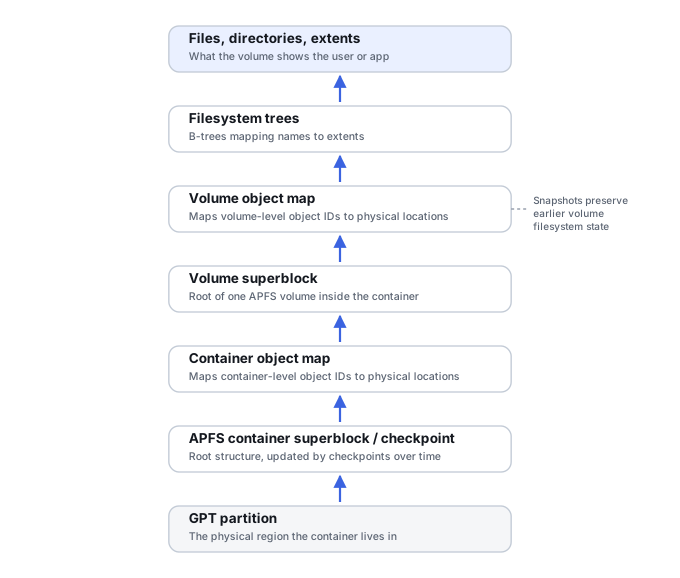
A GPT partition holds one APFS container; that container can hold several logical volumes sharing the same free space. Apple’s own File System Reference documents APFS objects as never modified in place — a change writes a new object, carrying its own object identifier (OID) and transaction identifier (XID), to a new location, while the old physical object can remain on disk until space is reclaimed. This is the single most important fact about how APFS actually fails: corruption is often a problem of reconnecting a consistent generation of these copy-on-write objects, not repairing one fixed superblock location.
Checkpoints and the object map preserve history by design
APFS keeps a checkpoint descriptor and data area, structured as a ring buffer, with a defined procedure for selecting the latest valid checkpoint at mount time. Damage to the very first, block-zero container superblock does not necessarily mean no usable container state exists — an older, still-valid checkpoint already on disk may describe a previous, coherent generation. The container’s object map is what actually translates a logical object identity and transaction ID into a physical address; if that lineage is lost, a filesystem tree object and its physical block can both survive while still being unreachable. See APFS Containers, Object Maps and Snapshots for the full model.
“Newest” is not automatically the right generation
Because objects are versioned by transaction ID, the same logical structure can have multiple historical physical versions on disk at once. Mixing objects from incompatible transaction generations can produce a reconstruction that mounts and looks plausible while still being internally incoherent. Recovery sometimes deliberately prefers an older, fully consistent namespace — an earlier checkpoint or snapshot — over a newer one that is only partially written. Even that older generation still needs to be validated against the expected volumes and file content, not simply assumed correct because it parses without error.
Encryption is a separate dependency from structure
APFS encryption state lives inside the object maps and volume metadata themselves, and can span different crypto generations during key transitions. A structurally well-reconstructed encrypted APFS volume is not the same thing as decrypted file recovery — surviving blocks without the correct key context stay unreadable no matter how completely the container and volume structures have been rebuilt. A formerly valid FileVault password being rejected is not, by itself, evidence that APFS metadata is corrupt: authentication, keybag, Preboot or volume-state problems can produce the identical user-visible rejection while the underlying structures remain intact.
The general approach
If the data matters and the underlying device may be unstable, preserve or image it before attempting file-system repair. On healthy storage, Disk Utility's First Aid is the standard Apple repair path for APFS, but it is still a write-capable repair operation and should not be described as inherently non-destructive. Also check Time Machine and any available snapshots or backups before modifying the affected volume. Genuine container-level damage may require block-level analysis and reconstruction.
Running First Aid repeatedly after it reports it can't repair the volume doesn't help — a second or third attempt won't succeed where the first didn't. At that point, imaging the drive before anything else touches it is the more useful next step.
This is the macOS-specific version of the general problem covered in File System Corruption. For how Time Machine's local snapshots fit into a broader backup plan, see Backup Drive Picks · Recovering from Snapshots & Previous Versions. For the underlying container/object-map/checkpoint model, see APFS Containers, Object Maps and Snapshots, and for how a boot failure can leave the Data volume untouched, see Computer Won’t Boot but the Drive May Still Be Healthy.
This page describes the general situation, not a guaranteed fix for your specific case. If you'd rather have someone experienced take a look before you try anything, see what a hands-on evaluation looks like.