Recovering Data from Snapshots and Previous Versions
Snapshots and previous-version features can turn an apparent deletion, corruption or ransomware incident into a version-selection problem rather than a raw-recovery problem. But a snapshot is not automatically an independent backup: many snapshots depend on the same storage, allocation metadata and copy-on-write relationships as the live data.
- Snapshots can turn a loss into a version-selection problem instead of raw recovery.
- A snapshot isn't automatically a backup: it often shares disks, pool and keys with the live volume.
- Crash-consistent and application-consistent snapshots give different guarantees.
- Deleting, merging or rolling back snapshots can destroy the history you need.
- Start from the most recent point confirmed to predate the loss, not simply the newest one.
A snapshot preserves a logical point in time
A snapshot records enough metadata to present a volume, file system, virtual disk or dataset as it existed at an earlier point — but different systems get there through physically different mechanisms, and it is worth not treating them as one operation. In a copy-on-write design such as Btrfs or ZFS, a snapshot and its source initially share the same underlying data blocks, and a new write to the live data is redirected to a freshly allocated block while the snapshot keeps pointing at the old one. Redirect-on-write at the block or storage-controller level, differencing/delta files, and application-aware mechanisms that coordinate a consistent capture are related but distinct techniques, each with its own rules for what is shared, what is duplicated and what triggers cleanup.
What they share is not the physical mechanism but the kind of result: a historical logical view, not necessarily a second physical copy of every byte — and, because of that sharing, a view whose availability depends on the same underlying pool, blocks or controller metadata the live data also depends on. The btrfs project documentation is explicit on this point for file-system snapshots: “a snapshot is not a backup”, and because blocks are shared, damage to the shared data can affect the snapshot and the original together.
Snapshot is not the same as backup
A backup is useful precisely because it can survive failures that affect the primary storage. A snapshot stored in the same pool may disappear with pool metadata corruption, controller failure, catastrophic media loss or administrative deletion. Snapshots are excellent for fast rollback and version history, but their independence depends on where and how they are stored.
A snapshot can preserve an earlier version against logical changes while still depending on the same disks, pool, encryption keys and mapping metadata as the live volume.
Different snapshot layers preserve different things
- File-system snapshots preserve a historical namespace and file extents, as in APFS, ZFS or Btrfs designs.
- Volume/storage snapshots preserve block-level mappings for a LUN or logical volume.
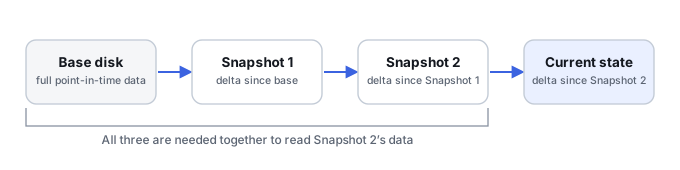
- VM snapshots often use base virtual disks plus one or more delta/differencing files. A VM snapshot may cover disk state only, or disk state plus the running memory and device state at the time it was taken — the hypervisor's own documentation for that snapshot type determines which; a disk-only snapshot restores crash-like boot behavior, not the exact running state, and should not be assumed to include RAM or guarantee application-level consistency unless the platform specifically says so for that snapshot.
- Application-aware snapshots may coordinate flushing or quiescing (for example, via the Volume Shadow Copy Service on Windows, which coordinates the actions needed to create a consistent shadow copy across registered writers) so databases and other active applications are captured more consistently — this coordination happens at snapshot creation time, and what exactly a given application needs to do to use its own data afterward is specific to that application.
- Cloud version history may keep previous object/file versions according to provider and retention policy rather than expose a local block snapshot.
A recovery point's name, label or newest timestamp does not by itself prove it is suitable to use. Before relying on one, it helps to record:
- Layer/product that created it (file system, volume manager, hypervisor, cloud service).
- Identity — which volume, VM, LUN or object it belongs to.
- Timestamp and time zone it was recorded in, since logs, incident timelines and snapshot metadata do not always share a clock or a zone.
- State at the time of the incident — was the source already affected when this point was captured?
- Base/parent dependencies it needs to be read at all.
- Keys needed if the underlying data is encrypted.
- Consistency evidence — was it application-aware, crash-consistent only, or unknown?
- Retention — the configured or documented retention policy, treated as a stated rule rather than a guarantee: deletion, quota limits, account permissions and provider-side policy changes can all end availability earlier than that stated window.
- Available safe export path — how to get data out of it without altering the source.
Scroll horizontally to see the full table →
| Type | Required dependencies | Safe extraction method |
|---|---|---|
| File-system snapshot (e.g. Btrfs, ZFS, APFS) | Shared data blocks in the same pool/volume; its own subvolume or dataset metadata | Browse or copy files from the snapshot's own mount point or namespace, without rolling the live file system back to it |
| Volume/storage (LUN) snapshot | The underlying pool, controller metadata and, for thin-provisioned pools, the shared data/metadata devices | Present the snapshot as a separate read-only device or clone before scanning it |
| VM snapshot (disk delta chain) | Every parent delta up to the base disk in the chain | Reconstruct the full chain on a copy, then mount the resulting virtual disk read-only, suppressing guest-filesystem journal/log replay where that option exists so the mount itself stays non-destructive |
| Cloud object/file version history | The provider's retention window for that object; sometimes its own export or download API | Download the specific version through the provider's own version-history or export feature |
On Linux device-mapper thin provisioning, an internal snapshot of a thin device does not need a separately tracked origin device the way an external-origin snapshot does — the kernel documentation notes there is no ordering requirement for activating or removing an origin and its internal snapshot, consistent with the snapshot staying usable after the original thin device is deleted. That snapshot still depends on the shared pool's data and metadata devices, not on the deleted origin specifically — deleting the pool itself, or the metadata device, removes the snapshot along with everything else in it. This behavior is specific to internal thin-provisioning snapshots; it should not be assumed for external-origin thin snapshots or for VM-style delta chains, where the dependency really is on the specific parent file.
Consistency matters as much as age
A crash-consistent snapshot represents blocks from one point in time but may capture an application while transactions were in progress. A file-system-consistent or application-consistent snapshot can provide a cleaner recovery point when it was created correctly. For databases, mail stores and virtual machines, the newest snapshot is not automatically the best one if it is internally inconsistent or already contains the corruption.
Do not destroy the history while trying to use it
Snapshot deletion, consolidation, merge, rollback and repair operations can modify the very metadata or delta files needed for recovery. VM platforms may offer commands that sound routine but commit or merge chains. Storage appliances may reclaim blocks after snapshot removal. When the incident matters, preserve the current configuration, metadata and snapshot components before experimenting.
Sequential delta chains require all relevant components
Not every snapshot is part of a sequential delta chain, but where one is — typically a VM consisting of a base disk plus a sequence of differencing files — all links back to the base are needed to read a given point. Opening only the base can show an old but internally valid file system; opening a delta without its parent may fail; using the wrong chain order can produce plausible but corrupt guest data. A missing or corrupted link limits full reconstruction of the specific dependent version built on top of it, but it does not necessarily destroy access to recovery points that do not depend on that link, or to extents the base disk and intact deltas still hold independently. Recovery should reconstruct the chain and validate the resulting virtual disk before guest-level file recovery.
Snapshots can preserve data that is no longer in the live view
If a file was deleted or changed after a snapshot, its old extents may remain referenced by the snapshot even though the current file system no longer exposes them. In that situation, extracting from the historical view is usually preferable to carving unallocated space because filenames, paths, timestamps and fragmentation information can remain intact.
Retention and space reclamation set the limits
Historical versions are only available while their references and underlying data remain retained. Snapshot expiration, deletion, pool pressure, garbage collection, cloud retention rules and administrative cleanup can remove recovery points. A user interface that no longer lists a snapshot does not by itself prove that no remnants exist, but it does mean recovery may have moved from normal version restoration to lower-level analysis.
A practical recovery order
When several recovery points exist, start with the most recent one confirmed to predate the loss, not simply the newest one overall, and verify important files or databases from it before considering any other candidate. Rolling back the live source should not be the first experiment — and creating a new snapshot after the incident does not restore the past state; it only adds another point going forward, and taking it can itself change storage or pool metadata.
- Preserve the affected storage or snapshot metadata before rollback, consolidation or repair.
- Inventory available recovery points using the fields above, and identify the layer that created each one.
- Prefer a consistent historical view that predates the loss, using the consistency evidence recorded for it rather than its timestamp alone.
- Prioritize browsing or exporting files from that historical view without rolling the live source back to it; create a separate recovery clone or copy if a fuller extraction is needed. A read-only mount may need to specifically prevent journal or log replay to stay non-destructive, and sometimes a controlled replay on a separate working copy, not the original, is what is actually needed to get a usable result — the exact option is specific to the file system or hypervisor involved, so there is no single universal mount command to rely on.
- Validate important files and application data.
- Use lower-level metadata recovery or carving only when usable historical mappings are unavailable.
Technical references: Btrfs: subvolumes and snapshots — shared data blocks · Microsoft: Volume Shadow Copy Service — consistent shadow copies · Linux kernel: device-mapper thin provisioning — internal snapshots
Related: Live Systems and Consistent Copies · Mounting a Damaged File System · Virtual Disk and Snapshot Chain Recovery · Recovering Deleted Cloud File Versions · Validating Recovered Data · Sparse, Thin-Provisioned and Virtual Storage · APFS Volume Corruption · Virtual Disk Corruption · Cloud Storage & Sync Data Loss · Ransomware Encryption