Memory Card Not Recognized or Asks to Be Formatted
An SD or microSD card can fail to appear, show the wrong capacity, or ask to be formatted for reasons that sit at completely different layers: the reader or adapter it's plugged into, the file system the operating system expects to find, the controller and flash-translation logic inside the card, or the physical flash itself. A format prompt doesn't identify which of those it is. Formatting writes new logical structures onto the card and can overwrite or replace evidence needed for recovery, so it should not be used to diagnose why the card became inaccessible.
Memory card not recognized or asks to format: what should you do next?
Answer one question about the current state. The result suggests the safer next step rather than diagnosing the failure.
In a known-good, compatible reader, does the card appear with its correct, expected capacity and hold that connection stably (even if it asks to format or shows as RAW)?
Start with the logical layer, but preserve the card first.
A card that reports the expected capacity and reads stably enough to image can reasonably be investigated first as a partition, file-system or content problem. That does not prove the card itself is healthy, so preserve a full image before repair or prolonged scanning.
Solve access before touching the file system.
A card that won't appear at its correct capacity, or won't hold a stable connection, is an acquisition problem first. Repeated insert/reformat/repair attempts on an already-unstable card risk losing the one stable read you might still get.
This guide classifies the next recovery action from observable information. It does not diagnose hardware condition or estimate a percentage chance of recovery.
First determine whether the card itself is visible and stable
A memory card usually reaches a computer through more path components than an internal drive does: the card itself, an SD adapter where a microSD card is used in an SD slot, a card reader, the reader's USB or host connection, and only then the operating system. Failing to appear through one reader or one adapter is not yet proof that the card has failed — a different reader, a different adapter, or a different USB port can behave differently for reasons that have nothing to do with the card's condition. This is worth checking once, in a reader that is known to work with other cards. It is not worth checking repeatedly if the card is already behaving unstably: if the card is already unstable, repeated insertion, power cycling and enumeration attempts can consume a limited window of usable access or aggravate an intermittent electrical, contact or controller problem, so testing should remain controlled and minimal.
| Observable state | Main branch |
|---|---|
| Not detected in any known-good, compatible reader or device | Device, controller, contact or media problem becomes more likely |
| Correct capacity, appears normally, but asks to format or shows RAW | Partition or file-system layer — see RAW Drive |
| Wrong or implausibly small reported capacity | Controller, translation or capacity-reporting problem |
| Disconnects, stalls or returns read errors | Unstable-source / acquisition branch |
| Stable and correct, but files are simply missing | Deletion recovery, not this Case |
| Stable and correct, but videos are broken or missing | See video branch below |
| Reports far more capacity than physically plausible | Counterfeit-flash branch below |
Treat this table as a router, not a diagnosis. More than one row can apply as a situation develops — a card that first showed wrong capacity can also become unstable, for example.
A format prompt is a symptom, not a diagnosis
“You need to format this card before you can use it” is what an operating system says when it cannot mount a volume it recognizes as a storage device — it is a response to an unreadable or unrecognized volume structure, not a test result about the flash underneath it. Formatting is not a diagnostic step: it creates a new, empty file system on top of whatever is there, which is the opposite of what a recovery attempt needs. The operating system can see a block device while still being unable to recognize or mount a usable volume on it, so a format prompt describes the host's inability to use the current logical structure; it does not identify whether the underlying cause is partition damage, filesystem damage, an unsupported structure, or a lower-level read problem. For more depth on each of those, see Drive Shows as “RAW”, Accidental Formatting and File System Corruption, which cover the same logic for drives generally.
Correct capacity and stable reads change the recovery path
A card that reports its correct, expected capacity and holds a stable connection while reading is far more consistent with a purely logical problem — a damaged partition table, file system or directory structure — than with a failing card. That combination does not prove the card is otherwise healthy, but it does make ordinary file-system-level recovery from an image of the card a reasonable next step. A card reporting the wrong capacity, or one that reads unstably, points lower in the stack, toward the controller, the flash-translation layer, or the physical media, and changes what a safe first step looks like.
Reader/adapter problems can imitate card failure
Card
The physical memory card.
Adapter
An SD adapter, when a microSD card is used in an SD slot.
Reader
A built-in slot or a separate USB card reader.
Host controller
The USB or SD host controller and its driver stack.
Operating system
Where the card finally appears as a storage device.
Each of these components can produce symptoms that look like a dead card without the card itself being at fault: a worn adapter contact, a failing reader, or a flaky USB connection can all cause a card to fail to enumerate, appear intermittently, or show implausible capacity. Windows' own SD driver stack, for one documented example, passes a card through a bus driver and a storage class/miniport driver before it ever reaches a file system — several layers exist between the physical contacts and anything the user sees. Swapping to a different, known-good reader once is a reasonable and safe check; treating every reader as equally suspect and cycling through many of them on a card that is already unstable is not.
When wrong capacity points lower in the flash stack
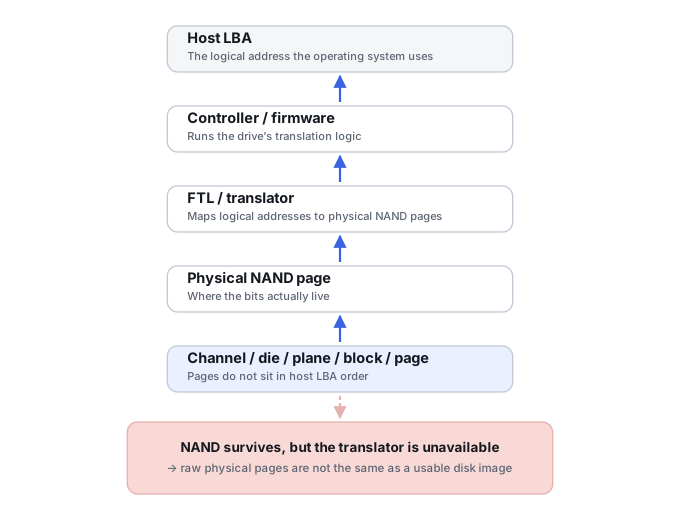
Correct capacity does not prove a card is healthy, but wrong capacity is informative on its own — the same distinction covered in more general terms by Drive Shows the Wrong Capacity. Modern SD and microSD cards are not simple, unmanaged NAND chips: like an SSD, they contain a controller that handles bad-block management, error correction and logical-to-physical translation. A card that reports 0 bytes, a changing capacity or an implausibly small capacity points below an ordinary file-system problem toward the device, controller, translation or access path — the reported capacity alone does not identify which internal component or metadata structure failed. That can call for a different recovery path than a straightforward file-system scan, closer to the flash-level work described for controller and translation-layer failures elsewhere on this site. Chip-off extraction and monolithic-package reconstruction, where they apply, are a Method-level and hardware-level topic, not something this Case walks through.
Counterfeit capacity is a different failure mode
A card that reports far more capacity than is physically present is a distinct situation, not an ordinary case of controller wear or bad sectors. Typical symptoms include older files becoming unreadable as new data is written, files that appear to save successfully but cannot later be read back, and corruption that recurs once writes pass a real, much smaller physical boundary than the reported one. This is address aliasing on top of a smaller real flash array, and it behaves differently from ordinary flash degradation — see Counterfeit Flash Capacity and Recovery Limits for how that mapping works and what it changes about recovery.
What you can check safely
Before formatting, repairing or writing anything: note the card's brand, capacity and type; note whether a different known-good reader changes the result; record the exact capacity the operating system reports; note whether the card is being used with an adapter; note any error text verbatim; note whether the problem appeared gradually or immediately after a specific event, such as being removed while writing; and, if the card is stable, make a full image before running any repair or recovery tool against the card itself. None of this requires writing to the card.
The safer recovery path
Stop
If access is already unstable, stop repeated insert/retry cycles.
Classify
Use the routing table above to place the symptom at a layer.
Preserve
Image a stable card before formatting, repairing or scanning it directly.
Work on the image
Run file-system or file-carving recovery against the image, not the card.
Recover elsewhere
Save recovered files to separate, healthy storage.
Validate
Confirm recovered files open and match what should be on the card.
When this becomes video recovery instead
A camera or card can be stable and correctly recognized while specific video files remain broken, incomplete or missing, because a recording was interrupted, allocation was lost, or container metadata was never finalized. Once the card itself reads reliably, that is a content-level problem rather than a card-access problem, and it is covered in more depth by Corrupted or Deleted Video from a Memory Card. If a specific video file already exists somewhere as a file — recovered or original — but won't play, see Corrupted Video File (MP4/MOV Won’t Play) instead; this Case does not repeat that container-level detail.
Don't treat a format prompt as a diagnostic result, and don't format, repair or repeatedly re-insert a card to “test” it. A different reader proving the card is detected doesn't prove the card is healthy, and correct capacity doesn't prove it either — both only rule out the layer they test. A memory card is not simply a small USB flash drive: its controller, packaging and failure modes differ enough that treating every card exactly like generic USB flash media can send recovery down the wrong path.
This Case is a router for memory-card access and format-prompt symptoms specifically; once the card mounts and the question is about specific missing or damaged files, see Corrupted or Deleted Video from a Memory Card and Corrupted Video File (MP4/MOV Won’t Play). For the underlying logical-layer explanations this page routes to, see Drive Shows as “RAW”, Drive Shows the Wrong Capacity, Drive Not Detected or Keeps Disappearing, USB Flash Drive Failure and File System Corruption · Counterfeit Flash Capacity and Recovery Limits.
This page describes the general situation, not a guaranteed fix for your specific case. If you'd rather have someone experienced take a look before you try anything, find a recovery provider by region.