Virtual Machine Disk Corruption
A virtual machine that won't boot can fail at several layers: the virtual-disk container, a snapshot chain, the guest file system, or the host storage underneath. Recovery starts by identifying the failed layer before any repair or consolidation writes are allowed.
Virtual disk corrupted: what should you do next?
Answer one question about the current state. The result suggests the safer next step rather than diagnosing the failure.
Is the VM still running or are snapshots/differencing disks still being changed?
Freeze the logical point in time first.
Preserve the base disk, snapshot chain, configuration and relevant host-storage state. A live copy can be readable yet internally inconsistent.
Reconstruct the virtual storage chain first.
Work from copies of the virtual disks and snapshot metadata. Determine whether failure is in the container/chain, guest file system or underlying host storage.
This guide classifies the next recovery action from observable information. It does not diagnose hardware condition or estimate a percentage chance of recovery.
What's actually happening
A VM's entire disk is really one file, or a linked chain of files, on the host's storage — a VMDK, VHDX, QCOW2, or similar — that the hypervisor presents to the guest operating system as if it were a physical drive. Corruption can hit at two different levels: the container format itself, such as its header, its internal block-allocation table, or a broken link in a snapshot chain, or the file system the guest operating system has inside that container — the same kind of problem covered in file system corruption, just one layer deeper. A host crash or an interrupted snapshot operation mid-write is the most common trigger for the first kind.
How recoverable this really is
Recoverability depends on which layer is damaged. A container-header or snapshot-chain problem can be relatively contained when all component files and the host storage remain readable. Missing or overwritten snapshot extents, datastore damage, or an underlying RAID/storage failure can make the same symptom much more serious. Guest file-system corruption is a separate inner layer to analyze after a consistent virtual disk can be reconstructed or exposed.
The virtual disk may not be a single file
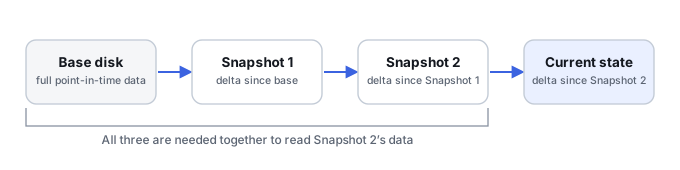
Many virtual machines depend on a chain: a base disk plus one or more snapshots, differencing disks or delta files. Configuration files determine how those pieces fit together. Copying only the largest VMDK, VHDX or other container can therefore preserve an incomplete point in time. Before repair, preserve the VM directory and storage metadata needed to reconstruct the chain.
What changes recoverability
The important distinction is whether corruption is in the virtual-disk container, the snapshot chain, the guest partition/file system, or the host storage beneath it. A guest operating system that will not boot may still have a perfectly readable virtual disk. Conversely, a healthy-looking guest file system cannot compensate for missing delta extents or unreadable host blocks.
What you can check safely
Record the hypervisor, virtual-disk format, expected snapshot order, file sizes and timestamps, and any recent snapshot merge, storage migration, host crash or datastore problem. Work from copies whenever possible. Do not consolidate snapshots, create a new disk with the same identifiers, or let the hypervisor automatically repair a chain until the original files and their relationships have been preserved.
Snapshot chains are block inheritance, not full copies
A snapshot only records the blocks that changed after it was taken — everything else falls through to its parent, and that parent's parent, back to the base disk. A snapshot chain is really a layered address map, so reading one guest sector can mean checking several files in sequence before the actual data turns up. This is why a missing or misidentified link partway up the chain doesn't just affect that one file — it can make blocks that were only ever changed at that link permanently unreachable, even though every other file in the chain is perfectly intact.
A CID mismatch is evidence to investigate, not a number to edit away by default
VMware descriptor files track this relationship explicitly with a CID and parentCID. A mismatch between a child's parentCID and its parent's actual CID is evidence that the declared parent-child relationship is inconsistent — but that inconsistency has two materially different causes, and which one applies has to be determined before touching the identifiers. Sometimes the descriptor metadata itself is wrong while the underlying parent and child block contents still form a valid chain; under specific, independently verified conditions, correcting the CID/parentCID metadata is an accepted repair. Other times the parent disk was actually modified, or the wrong disk was written to, after the child was created — often from an incomplete snapshot operation or files copied from an inconsistent set — and in that case the block contents no longer form a valid chain at all. Editing CID/parentCID can be appropriate only once the correct chain is independently established and the mismatch is known to be metadata-only; it must never be used to force together generations whose contents have actually diverged, since that only stops the safeguard from reporting the problem without resolving it.
VHDX and QCOW2 carry their own internal allocation metadata
A VHDX's block allocation table and differencing sector bitmaps, and a QCOW2 image's L1/L2 tables and refcounts, are what actually map guest blocks to physical data inside those formats specifically. Recovering the outer VHDX or QCOW2 file intact says nothing about whether that internal map is still valid — see VHDX and QCOW2 Internal Metadata Recovery for how each format protects, and can lose, that mapping.
Validate the guest file system only after the virtual chain is reconstructed
A guest NTFS, ext4 or APFS parser expects a coherent virtual block device underneath it. If a snapshot layer is missing or wrongly mapped, guest filesystem metadata can appear randomly damaged, page checksums can fail, and the guest may not boot at all — symptoms of an incorrect virtual-disk reconstruction, not necessarily of real guest-level corruption. Running CHKDSK or fsck inside a guessed, unverified chain risks writing changes based on a false premise.
The general approach
Recovery generally works in two possible stages: first repairing or bypassing the container-format issue — rebuilding a damaged header, reconnecting an orphaned snapshot to its correct parent, or extracting the raw disk contents directly from a container whose own metadata can't be trusted at all — to get at the guest disk's raw bytes, then treating that raw data with standard file-system or file-level recovery as needed. A successful power-on or a completed consolidation only proves that the hypervisor accepted the result as operational — it is not proof that every recovered block represents the intended historical VM state, so validate against known-good file contents, checksums or application-level checks before treating a booting VM as fully recovered.
Don't let the hypervisor "consolidate" snapshots or run automatic repair on a disk chain that's already showing errors. Consolidation is a write-heavy operation across the entire chain, and running it on a chain that's already inconsistent is a common way to lose the ability to recover individual snapshot states at all.
For the full chain-reconstruction mechanics, see Virtual Disk Snapshot and Differencing-Chain Recovery and VHDX and QCOW2 Internal Metadata Recovery · Understanding Storage Layers Before Recovery · Recovering from Snapshots & Previous Versions. If the guest itself runs a database, see Database Corruption.
This page describes the general situation, not a guaranteed fix for your specific case. If you'd rather have someone experienced take a look before you try anything, see what a hands-on evaluation looks like.