FileVault, APFS Encryption and Hardware-Bound Keys
Modern FileVault is an APFS key hierarchy backed by Secure Enclave hardware on Apple silicon and T2 Macs — recovery can depend on the original hardware and recovery-key state, not only on an offline copy of the disk.
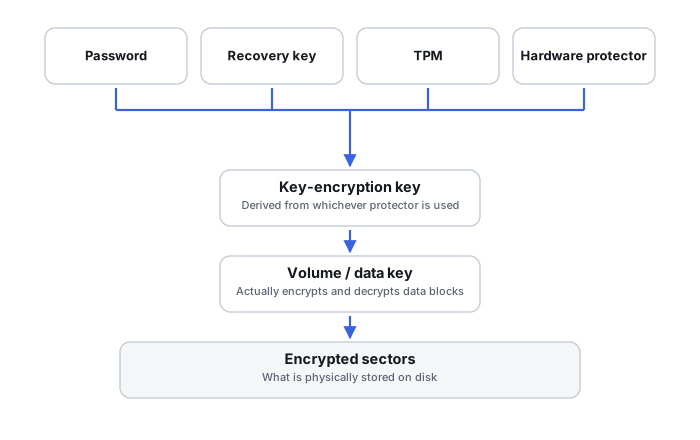
A volume key wrapped through a KEK
Apple documents APFS volumes as having a volume encryption key that protects the volume and its metadata content. That key is wrapped with a key-encryption key (KEK); when FileVault is enabled, the KEK is protected by a combination of the user's password and the hardware UID, with the key-handling operations themselves occurring inside the Secure Enclave rather than being exposed directly to the CPU. The password is an authentication input into this hierarchy, not the raw volume-encryption key.
Secure Token is a distinct object from the password
Apple defines a Secure Token as a wrapped version of the KEK relationship, protected by a user's password. The password unlocks the Secure Token/KEK relationship, which in turn reaches the volume key — another instance of the same principle running through this whole cluster: the credential a person holds is not the key that actually encrypts the data.
Modern Mac internal storage is encrypted even when FileVault is “off”
On Apple silicon and T2-equipped Macs, Apple documents internal APFS volumes as already encrypted regardless of the FileVault toggle. With FileVault off, the volume encryption key is protected primarily by the hardware UID; enabling FileVault adds user-password protection into that same hierarchy. “FileVault off” does not mean plaintext NAND on this class of hardware, and physical recovery expectations should be set accordingly.
Password changes do not require re-encrypting the volume
Because the volume encryption key remains the actual payload-encryption key while only the higher wrapping layer changes, Apple's key hierarchy lets a user change their password without the system re-encrypting the entire volume — the same general principle that applies to BitLocker and LUKS.
Personal Recovery Key and MDM escrow are major recovery assets
Apple supports a Personal Recovery Key (PRK) as an alternate recovery path, and PRKs can be escrowed by device management systems in managed deployments; for modern Apple silicon systems, Apple specifically recommends PRK-based management over relying on Institutional Recovery Keys. For managed devices, preserve user login credentials, the PRK itself, MDM escrow records, recoveryOS availability, and where hardware-bound key handling actually matters, the original Mac hardware.
Hardware UID changes what offline attack even means
Apple states that on modern Apple silicon and T2 Macs, the key hierarchy combines the user password with a hardware UID reachable only through the Secure Enclave, specifically to make offline attacks against removed storage ineffective. Imaging the internal storage of one of these Macs does not necessarily hand over an independently brute-forceable FileVault container — this claim needs to stay model- and generation-specific, since older Intel/CoreStorage Macs and removable encrypted media behave differently.
Removable media does not inherit the same hardware binding
Apple explicitly states that encryption of removable storage does not use Secure Enclave capabilities the same way internal storage does on Apple silicon/T2 systems. FileVault/APFS encryption should not be described with one universal hardware-bound recovery model — modern internal Apple silicon/T2 storage, older Intel/CoreStorage APFS, and removable encrypted APFS volumes are three separate cases.
Cryptographic erase is a real destruction mechanism
Apple documents that on Apple silicon/T2 systems, securely deleting the relevant media or volume key leaves encrypted blocks physically present while making decryption cryptographically impossible. Physical survival of ciphertext is not the same thing as survival of the ability to decrypt it — a concept that connects directly to SSD secure-erase behavior and to cryptocurrency key loss.
Decrypt the volume before repairing the APFS filesystem
As with BitLocker and LUKS, an APFS filesystem repair tool has no basis for interpreting ciphertext as a valid filesystem structure. Recovering the encrypted container — the correct key, KEK and volume relationship — comes before any attempt at APFS-level filesystem reconstruction, not after.
For modern FileVault, preserving the original computer can matter as much as preserving the removed storage device — hardware-bound key handling can make the two genuinely inseparable.
Related: Encryption Key Hierarchies and Recovery Metadata · APFS Container or Volume Corruption (macOS) · Locked Out of an Encrypted Volume · Computer Won’t Boot · APFS Containers, Object Maps and Snapshots · Encryption and Ransomware Recovery Tools