Sparse, Thin-Provisioned and Virtual Storage Recovery
Sparse files, thin-provisioned volumes and dynamic virtual disks are related but different mechanisms that all separate how much capacity something reports from how much is actually allocated. Each depends on its own mapping and its own metadata, and losing that mapping — not losing the underlying bytes — is one common way recovery breaks down, though not the only one. Which acquisition approach to use, and which dependencies to preserve alongside it, depends on identifying which of these mechanisms is actually involved and which layer failed.
- Sparse files, thin volumes and dynamic virtual disks can allocate less storage than their reported logical capacity.
- Each depends on its own mapping metadata; losing it can make intact data unreadable.
- A true sparse hole, a lost mapping entry and an unallocated region can look the same.
- Preserve the whole dependency set: metadata device, data device, pool configuration, parent chain.
- Reconstruct mappings before carving; carving is the fallback, not the first step.
Scroll horizontally to see the full diagram →
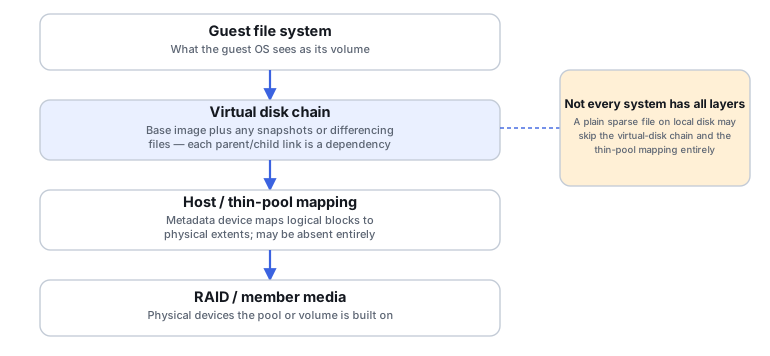
Logical capacity is not allocated capacity
A sparse file, a thin-provisioned LUN or volume, and a dynamic or differencing virtual disk are three related but distinct mechanisms, each with its own owner for the mapping between logical address space and what is actually allocated.
Scroll horizontally to see the full table →
| Mechanism | Mapping owner | Required metadata | What an unallocated region means |
|---|---|---|---|
| Sparse file | The host file system | The file system's own allocation metadata for that file | Reads as zero, by the file system's own sparse-file semantics |
| Thin-provisioned LUN or volume | The storage pool's thin-provisioning layer | In the Linux dm-thin implementation specifically, a separate metadata device mapping logical blocks to physical extents (see the Linux device-mapper thin-provisioning documentation); other thin-provisioning implementations may structure this mapping differently | May be a genuine unwritten region that reads as zero, or it may reflect a missing or damaged mapping entry — these look the same from a single read and need to be told apart |
| Dynamic (expanding) virtual disk | The virtual disk format's own block-allocation table, with no separate parent file involved | The format's internal allocation metadata | Means "not yet written," resolved entirely within this one file — there is no parent to inherit from |
| Differencing virtual disk | The virtual disk format together with its parent chain | Parent-chain metadata inside the differencing file, plus every parent file it actually points to | May mean "not yet written here, inherit from the parent," or it may mean the parent is missing or unreachable — very different situations that read similarly at the container level |
These three "looks like a hole" cases are not the same thing, and conflating them is a common mistake: a genuine sparse hole is zero by design; a missing mapping entry caused by corruption can look identical to a hole without actually being one; and a region that reads as zero because an acquisition itself failed or was damaged is a third, unrelated cause that also happens to look the same. None of these should be assumed from a single zero-filled read alone.
Preserve the dependency set
For a thin-provisioned volume, that means the metadata device and the data device together, plus the pool's own configuration — the metadata device alone does not describe real content, and the data device alone cannot be interpreted without the mapping. For a virtual disk, that means the base image plus every parent and child file actually in its chain, plus whatever format-specific metadata ties them together. For a system built on snapshots, that means the snapshots plus their shared extents and the generation relationships between them. Whether a snapshot is independent of a separate origin file depends on how it is implemented. An internal snapshot inside a thin pool (see the Internal snapshots section of the Linux device-mapper thin-provisioning documentation) shares the pool's own metadata and data devices with its origin, so preserving the pool already preserves both — there is no separate origin file that can go missing. An external-origin or differencing-style snapshot is different: it depends on a separate origin or parent file (see that same documentation's External snapshots section), and preserving the snapshot without that file preserves an incomplete and likely unusable artifact. Confirm which kind is actually in use before assuming either way.
Illustrative example: a current differencing file without its parent
A virtual machine's current differencing disk file was copied and preserved, but its parent base image was not.
A differencing file only records the blocks that changed since its parent. Without the parent, the guest's actual data is incomplete no matter how intact the differencing file itself is.
Locate and preserve the parent chain before attempting to open or reconstruct the guest volume.
Confirm every link in the parent chain is present and matches the identifiers the differencing file actually references.
Illustrative example: an intact data device without its mapping metadata
A thin pool's data device is intact and contains readable extents, but its metadata device was lost or never preserved.
The data device alone does not record which logical volume or logical block address each extent belongs to — that assignment lives only in the metadata device.
Treat this as a mapping-recovery problem before anything else; carving the data device directly skips the question of which extent belongs where.
Reconstructed mapping should be checked against known file signatures or structures at more than one extent before being trusted.
Identify the failed layer
Identify which layers are actually present before working on any of them — not every system has a virtual container, a parent chain, or a pool mapping. Where one layer depends on another (a differencing file depends on its parent chain; a thin volume depends on its pool mapping), that dependency has to be resolved before the layer above it can be trusted. The guest file system inside a virtual disk is the one layer that only makes sense once everything beneath it presents a correct block view; the exact order for everything else depends on the topology actually involved, not one fixed sequence.
Choose acquisition deliberately
Which acquisition approach fits depends on which layer you can still reach and what you need preserved alongside it.
Scroll horizontally to see the full table →
| Acquisition approach | What it preserves | What it does not preserve |
|---|---|---|
| Logical block image of an exposed LUN/volume | The already-resolved, exposed blocks as seen through that mapping | The pool or thin metadata, or the parent chain, behind that mapping — none of that is captured separately |
| Copied virtual disk file (the container itself) | That one container's own data and format metadata | Its parent or backing files, for a differencing or overlay disk — those are not automatically included |
| Physical pool copy (member devices, bit for bit) | The lower-level structures needed to reconstruct the mapping afterward | Nothing is automatically resolved — the mapping still has to be reconstructed to make sense of it |
Point-in-time consistency
Copying several dependent files while a system is live, one after another, does not guarantee they share a common generation — a base image copied before a differencing file finishes a write, for example, can leave the pair internally inconsistent even though both files are individually intact. Do not consolidate, merge, or repair a pool directly on the original members while the actual state is still uncertain; work from preserved copies instead.
Reconstruct mappings before carving
Signature-based carving is a salvage fallback for when mapping reconstruction genuinely is not possible, not a first choice. Carving across a thin pool or virtual-disk chain without first reconstructing the mapping can mix objects from different volumes or different points in time, and it does not guarantee correct membership or logical ordering within a file the way an intact mapping does.
Validate across allocation boundaries
Check reported logical capacity against what the mapping actually accounts for, spot-check individual mapping entries against known content, confirm which snapshot or generation identity is actually in use, and check guest files on both sides of allocation boundaries specifically — the boundary between an allocated and an unallocated region is exactly where a reconstruction mistake is most likely to surface.
What should you establish first?
Answer a short sequence of questions about what you currently know and have preserved. Each result points to a safer next step, not a diagnosis of the storage stack.
This guide also works without JavaScript. The same sequence, as a static walkthrough:
Do you know which storage-stack layers are actually involved (virtual disk chain, thin or pool mapping, RAID, and so on)?
- Yes → continue to the next question.
- No or not sure → Outcome: Inventory the storage-stack layers before doing anything else. See Identify the failed layer, and Understanding Storage Layers Before Recovery.
Are the base image and parent files, or the pool's mapping metadata, actually available to you?
- Yes → continue to the next question.
- No or not sure → Outcome: Locate the missing dependencies before flattening or consolidating anything. See Preserve the dependency set.
Are the copies you have consistent with each other at the same point in time?
- Yes → continue to the next question.
- No → Outcome: Preserve the available states separately and investigate before assuming any shared timeline. See Point-in-time consistency.
- Not sure → Outcome: Establish which generation each copy actually represents before treating them as a set. See Point-in-time consistency, and Storage Metadata Generations and Consistency.
Has the mapping been reconstructed and checked?
- Yes → Outcome: Inspect the guest file system now that the mapping is confirmed. See Reconstruct mappings before carving, and How to Validate Recovered Data.
- No or not sure → Outcome: Work at the mapping level before any guest-filesystem or carving attempt. See Reconstruct mappings before carving, and File Carving and Signature-Based Data Recovery.
This guide suggests a next step from the information you provide. It does not diagnose the storage stack or confirm that what you entered is accurate.
Technical references: Linux kernel: device-mapper thin provisioning — metadata and data devices · QEMU: qemu-img — virtual vs. disk size, backing chains, map
Related: RAID Reconstruction Basics · Understanding Storage Layers Before Recovery · Recovering Data from Snapshots and Previous Versions · VHDX and QCOW2 Internal Metadata Recovery · Virtual Disk Snapshot Chain Recovery · Virtual Machine Disk Corruption · LUN, Thin Provisioning & Snapshot Recovery · File Carving and Signature-Based Data Recovery.