Drive Shows the Wrong Capacity
A disk reporting 0 B, a few megabytes, or a capacity far smaller than expected is an addressing or translation symptom—not evidence that the missing data area was erased.
Wrong drive capacity: what should you do next?
Answer one question about the current state. The result suggests the safer next step rather than diagnosing the failure.
Does the physical device itself report the wrong capacity, rather than only a partition, volume or used/free-space value being wrong?
Confirm the device-level number before assuming failure.
A wrong device-level capacity means two different things depending on history. If the capacity has been wrong since the device was first used, this often points to counterfeit or misconfigured flash rather than a failure — verify the actual physical capacity before assuming anything was erased. If a previously correct capacity changed after a specific event (a drop, disconnect, firmware update or enclosure swap), treat it as a new firmware, controller or bridge failure instead: stop using the device and preserve what is still readable.
Counterfeit Flash Capacity and Address Aliasing → · Safe Imaging →
This is not a device-capacity problem.
If the physical device itself reports the correct capacity, the problem sits in the partition, filesystem or accounting layer instead — not in the device. Compare each layer's reported size in the table below before deciding on a repair approach.
Drive Asks to Be Initialized → · Files Missing but Storage Space Is Still Used →
This guide classifies the next recovery action from observable information. It does not diagnose hardware condition or estimate a percentage chance of recovery.
Which layer is reporting the wrong size?
The question above assumes the device itself is reporting an abnormal capacity. Before assuming that, confirm which layer is actually wrong — a device's capacity, a partition's extent, a filesystem's volume size, and used/free space accounting are four separate numbers, and a mismatch at one does not prove damage at another. A 4 TB device with a 500 GB partition is not the same problem as a device that identifies itself to the host as only 500 GB. Likewise, a correctly sized volume reporting implausible free space is a filesystem/accounting problem, not necessarily a device-capacity problem.
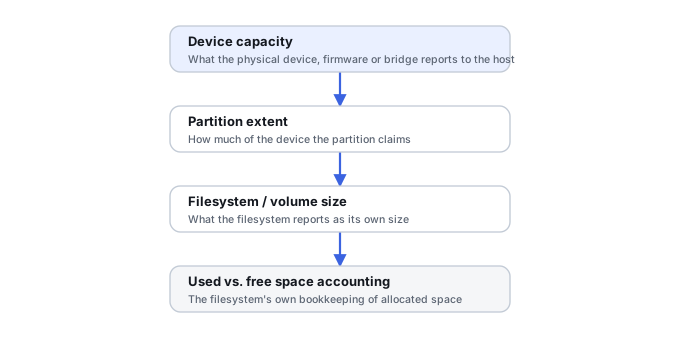
| Where the size is wrong | Likely layer to investigate |
|---|---|
| Device itself reports 0 B, a tiny size, or an implausible capacity | Bridge, firmware, translator, controller, or counterfeit flash |
| Device size is correct; partition is too small or missing | Partitioning / layout |
| Partition size is correct; filesystem size is wrong | Filesystem / volume metadata |
| Volume size is correct; used/free space looks wrong | Allocation metadata, snapshots, or hidden-but-reachable data |
| Capacity has always been implausible, since first use | Counterfeit or misconfigured storage becomes more likely |
| A correct capacity changed after a specific event | New device, firmware, controller or translation problem becomes more likely |
"Likely layer" — not a diagnosis by itself.
If the device, partition and filesystem sizes are all correct and only the used/free accounting looks wrong, this is no longer primarily a capacity article — see Files Missing but Storage Space Is Still Used. If the disk object exists but Windows cannot interpret the expected layout at all rather than reporting a wrong size, see Drive Asks to Be Initialized instead.
What wrong capacity can mean
Capacity is reported through several layers: the device firmware, controller, USB/SATA/NVMe bridge, storage enclosure and operating system. A 2 TB drive suddenly appearing as 3.86 GB or 0 B may be exposing a firmware or controller failure, an incomplete device state, a bridge limitation, or an unusual configuration. A normal physical capacity with only a small partition visible is a different problem and belongs closer to partition recovery.
What to check safely
Compare the model number and physical capacity reported by BIOS/UEFI, the storage controller and the operating system. Distinguish “disk capacity” from “volume size”: a 4 TB disk with a 100 MB visible partition is not the same as a disk whose device itself reports 100 MB. Note any recent enclosure change, USB adapter, controller replacement, firmware event or RAID migration. Save screenshots rather than repeatedly probing an unstable device.
Why the distinction matters
File-system recovery software works inside the address space the device exposes. If a controller reports only a tiny fraction of the real media, a scan cannot magically read LBAs that are not addressable. Conversely, if the full disk capacity is correct and only partition boundaries are wrong, the underlying sectors may be completely accessible and the problem may be logical.
Recovery paths
With correct physical capacity and stable reads, image the source and investigate partition/file-system structures. With incorrect device-level capacity, first preserve the original hardware context and identify whether the limitation comes from the drive, enclosure or controller. HDD firmware faults and SSD translation-layer failures can require specialist access methods. Avoid commands that alter HPA/DCO, firmware, namespace or RAID metadata unless the exact cause and original configuration are known.
What not to infer
Wrong capacity does not by itself tell you that platters, NAND or files are damaged. It also does not justify repartitioning to “restore” the missing space. Creating a new partition table only describes a new logical layout inside whatever address space is currently visible; it does not repair the reason the device reports the wrong size.
Was the capacity always wrong, or did it change after a failure?
This one question separates most wrong-capacity cases into the right category. A device that reported the correct capacity for a long period of normal use and then changed is almost always a controller, firmware, translator or bridge failure, not counterfeit media — see SSD Firmware, Translator and Controller-Level Recovery. A device that reported an implausibly large capacity from the very first time it was used, especially cheap unbranded flash media, is a stronger candidate for genuinely counterfeit capacity. The four underlying classes are distinct: a controller or firmware failure misreporting capacity it once reported correctly; a USB/SATA bridge or old enclosure limiting what capacity can be addressed at all; an OS or partition layer exposing a smaller volume while the device itself reports its correct full capacity; and counterfeit flash whose controller was built to lie about capacity from the start.
Counterfeit flash is a firmware-level lie, not a partition mistake
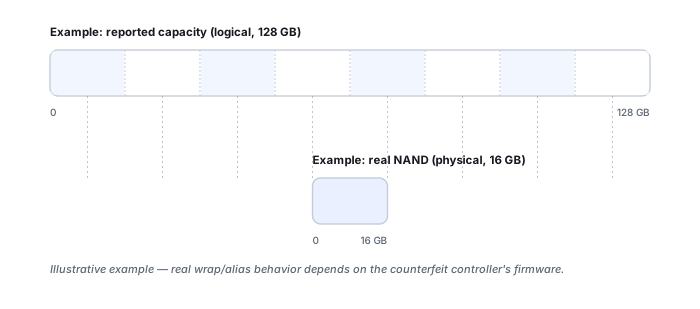
A counterfeit USB or SD device can have its controller report a logical capacity far larger than the NAND actually installed, and the host will create a filesystem across that entire false address space without complaint. The device can look completely normal until enough unique data has been written to exceed the real physical capacity — at which point logical addresses can alias or wrap onto NAND that earlier logical addresses were already using, genuinely overwriting earlier data rather than merely mis-describing capacity. See Counterfeit Flash Capacity and Address Aliasing for how that aliasing happens and what it means for the data already on the device.
Verifying claimed capacity means writing test data across the device and reading it back — tools built for this, such as the F3 project's f3write/f3read/f3probe, can overwrite existing data, and f3probe --destructive is explicitly destructive. Run this kind of test only on new or already-empty media, never on a device that still holds files you need to recover.
Do not save recovered files, install software, create partitions, format, initialize or run write-capable repair tools on the only copy of the affected data. When practical, work from a verified image or another preserved copy.
Related reading: Partition Loss · Drive Not Detected · Ssd Controller Failure · Files Missing but Storage Space Is Still Used · Understanding Storage Layers Before Recovery · HDD Firmware, Service Area and Translator Recovery · USB/SATA & NVMe Adapters · SMART & Drive Diagnostic Tools · Drive Asks to Be Initialized · Counterfeit Flash Capacity and Address Aliasing · USB Flash Drive Failure.
This page describes the general situation, not a guaranteed fix for a specific case. If the source is unstable or the data is irreplaceable, consider a professional evaluation before further attempts.