USB Flash Drive Failure
A USB flash drive can fail at the connector, power, controller, firmware/translation or NAND level, and the right recovery path depends on whether the device still exposes stable logical sectors.
USB flash drive failure: what should you do next?
Answer one question about the current state. The result suggests the safer next step rather than diagnosing the failure.
Does the flash drive still expose stable, consistent logical sectors — enumerate correctly and read without errors?
Preserve the logical data now.
If logical access is genuinely stable, image the exposed sectors before further testing — controller-level problems can become intermittent or worsen.
Chip-level recovery may be required.
Unstable or absent logical access on flash media can mean a controller, firmware or translation-layer failure — the right approach depends heavily on the specific controller family.
This guide classifies the next recovery action from observable information. It does not diagnose hardware condition or estimate a percentage chance of recovery.
Two symptoms point toward different problems here: a drive that simply stops appearing is a detection question first, while a drive that appears but reports an implausible or wrong size is a capacity question — cheap or counterfeit flash controllers can misreport size without failing outright.
What can fail in a USB flash drive
A flash drive is more than NAND memory. It includes a USB interface, controller, power circuitry, firmware and a translation layer that maps logical sectors to physical flash pages while handling ECC, bad blocks and wear. A broken connector can be electrically simple; a controller or translation failure can make intact NAND inaccessible through normal USB commands.
Symptoms that matter
Distinguish a drive that is not detected at all from one that appears with the correct capacity, one that reports 0 B or a tiny capacity, and one that reads but produces errors or disconnects. Also note whether failure followed physical bending, liquid exposure, overheating or an interrupted write. Do not repeatedly format or initialize a device that suddenly reports an unfamiliar capacity.
Logical access comes first
If the flash drive exposes the correct capacity and reads stably, image it before file-system recovery. A RAW or unallocated volume may still be a logical problem. If the device is unstable, prioritize acquisition of readable sectors. If it does not expose meaningful logical sectors, ordinary recovery software has nothing to scan.
Why chip-level recovery is not universal
Reading NAND directly is not equivalent to reading a disk image. Raw flash may contain ECC data, scrambled pages, interleaving, bad-block substitutions and controller-specific mapping; some devices also use encryption. Reconstructing the controller’s logical view can be the central recovery task. Monolithic flash devices may require access to test points rather than simply removing a memory package.
Discrete NAND vs. monolithic devices
Some flash drives have a separate, removable NAND package with a known pinout; many compact USB sticks and microSD-style designs instead integrate controller and NAND into one monolithic package or module, with no chip to lift off at all. Monolithic devices can require removing a protective coating, locating test points, X-ray or logic-analyzer work and controlled micro-soldering — specialist, model-specific work rather than a generic technique. "Monolithic" does not mean unrecoverable; it means the normal physical-access path may be different and device-specific. See Chip-Off, ISP and Monolithic Flash Recovery for what that involves.
Chip-off vs. ISP
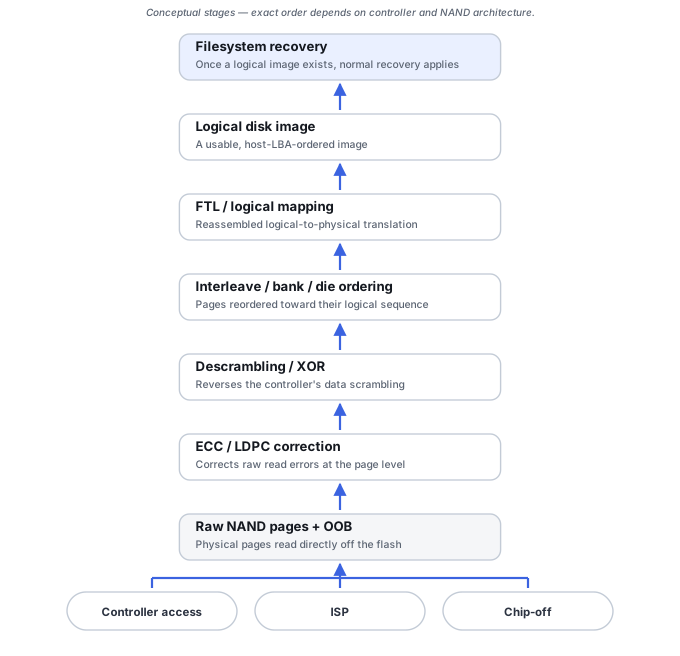
Chip-off removes the NAND package and reads it through an adapter; in-system programming (ISP) instead reads the NAND through test points while it stays soldered to the board, which can avoid the heat and mechanical risk of desoldering and is sometimes the only option on a monolithic device. Neither approach removes the need to reconstruct the controller’s logical mapping afterward — both produce a raw dump, not a disk image.
Raw NAND reconstruction chain
Getting from a raw chip dump to usable files typically means working through NAND geometry and page/spare-area layout, ECC detection and correction, descrambling or XOR removal, bad-block and bad-column handling, joining planes and chips in the controller’s actual interleave order, and only then reconstructing the translator that maps physical pages back to logical sectors. Not every controller uses every step, and the order can vary — ECC may be computed over different transformed forms of the data depending on controller design, so "remove XOR, then run ECC" should not be assumed to be a universal fixed order. See Flash Translation Layers and NAND Mapping for why that mapping exists and why raw NAND is not equivalent to a disk image.
Controller families change ECC, XOR and translation
USB flash controllers from different vendors lay out pages, apply ECC, scramble data and number blocks differently, so a NAND part number alone does not describe how a given drive’s controller organized it. Identifying the controller family before attempting reconstruction — from board markings, VID/PID or visual layout — matters more than the raw NAND chip identity itself. See Flash and SSD Controller Recovery Tools for the tool classes involved.
Avoid making a repair problem harder
Do not resolder connectors unless you can preserve pad integrity and know the pinout, do not heat the controller/NAND as a generic “reflow” experiment, and do not discard damaged PCBs. For important data, physical or controller-level symptoms are a reasonable stop condition for DIY attempts.
Do not save recovered files, install software, create partitions, format, initialize or run write-capable repair tools on the only copy of the affected data. When practical, work from a verified image or another preserved copy.
Related reading: Drive Not Detected · Wrong Drive Capacity · Raw Drive · Ssd Recovery Fundamentals · Software vs. Hardware Recovery · When Software Is Not Enough · Chip-Off, ISP and Monolithic Flash Recovery · Flash Translation Layers and NAND Mapping.
This page describes the general situation, not a guaranteed fix for a specific case. If the source is unstable or the data is irreplaceable, consider a professional evaluation before further attempts.