Data Lost to an OS Reinstall
An OS installer writing a fresh system onto a drive is, from a data-recovery standpoint, one of the more aggressive things that can happen to it — not because it deliberately wipes everything, but because installing and then using a new operating system generates a lot of write activity in a short window.
OS reinstalled over data: what should you do next?
Answer one question about the current state. The result suggests the safer next step rather than diagnosing the failure.
Has the reinstalled system continued booting, updating or being used since the loss?
Further writes reduce recoverable remnants.
Shut down normal use and preserve the storage. Recovery depends on which original regions have already been overwritten or deallocated.
Preserve the post-install state now.
Image the storage before additional boots or software installation, then search for surviving file-system metadata and content from the preserved copy.
This guide classifies the next recovery action from observable information. It does not diagnose hardware condition or estimate a percentage chance of recovery.
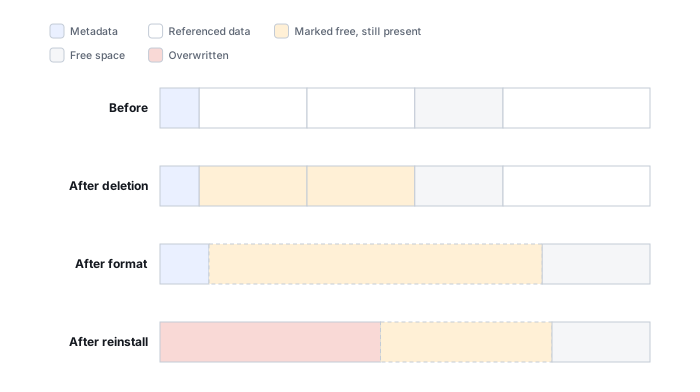
What's actually happening
Installing an operating system is not one write, it's a whole chain of them — partitioning, formatting, file copying, first boot, updates and ordinary use each generate their own write activity, and exactly the kind that overwrites recoverable free space the fastest (the full sequence is below). If the system was used normally afterward — browsing, installing applications — that compounds the problem further with every hour that passes.
If the machine merely would not boot before the reinstall, the user data may have been recoverable without reinstalling onto the same storage — see Computer Won’t Boot but the Drive May Still Be Healthy for how to tell a boot problem from an actual data problem before reaching for a reinstall.
How recoverable this really is
How this plays out varies enormously, and time is the deciding factor. Recoverability depends heavily on whether the old data lived on the same partition the installer reformatted or reused, versus a separate drive or partition the installer never touched; and on how much the system was used after the fact. If the operating system went onto a separate drive and the old data drive itself was left alone, recovery odds can still be quite good — this scenario is sometimes assumed to be hopeless when it isn't. If the old data's own partition was the install target, odds decline sharply the longer the system keeps running.
A reinstall is a sequence, not one event
"Reinstalling the OS" describes an outcome, not a single write. It's a chain of separate stages, and each one can reach a little further into whatever old data was on that drive:
Partition/layout changes
The installer creates, deletes or resizes partitions before anything else happens.
Formatting / filesystem creation
New file-system structures replace some of the old metadata on the target partition.
OS files copied
Thousands of system files are unpacked and written across the newly formatted volume.
First boot
The new system initializes its own configuration, registry or equivalent state.
Logs, swap/pagefile & temp data
The OS creates working files that grow and move as the system runs.
Updates
Update packages can be some of the largest writes in the whole sequence.
Applications installed
Every reinstalled application is more files written to more of the drive.
Continued use
Ordinary browsing, saving and background activity keeps consuming free space.
Each stage can expand the region whose old contents have been overwritten or deallocated — which is why the honest answer to "is my data still there" depends on exactly how far down this list things got, not on the single word "reinstalled." Some old areas may remain completely untouched even after stage 8, while others were gone by the end of stage 2; recovery depends on where the old files were allocated relative to which of these stages actually reached them, not simply on how many gigabytes the installation consumed in total.
What changes recoverability
A reinstall onto the same existing file system differs from deleting/recreating partitions or formatting them first. HDD and SSD behavior also diverges because formatting and deletion on an SSD may trigger deallocation/TRIM in addition to direct overwrite. Encryption can further change the picture if the reinstall replaced key material needed to interpret the previous volume.
Two independent effects, not one
A reinstall can hurt recoverability two separate ways, and they don't always happen together: writes and deallocation destroying the old data's extents (see what overwrite actually destroys), and, on an encrypted volume, the installer replacing key material needed to interpret otherwise-intact ciphertext (see encryption key hierarchies and recovery metadata). Sometimes the limiting factor is overwrite, sometimes it's lost key material, and sometimes it's both at once — worth telling apart before assuming the data is gone.
What you can check safely
Stop using the new installation and record exactly what installer options were chosen: upgrade versus clean install, partition deletion or recreation, formatting, and any post-install updates or applications. Note the old and new file systems and whether encryption was enabled. Recovery should then be performed from an image or preserved source, with results validated file by file because surviving metadata can still point to partially overwritten content.
The general approach
The same metadata-scanning and signature-carving techniques used throughout this catalog apply here too, but success is essentially a race against however much writing has already happened since the moment of loss. The priority is stopping and imaging whatever's left as early as possible, rather than continuing to troubleshoot on the live system.
The moment you realize a reinstall happened over data that mattered, stop using that machine and drive entirely. Every additional boot, update check, or background service running in the meantime is more writes landing on the exact space that needed to survive untouched.
For the mechanics behind every stage in the sequence above, see What Overwrite Actually Destroys and, once something has been recovered, Validating Recovered Data — a correct filename after a reinstall is even less reassuring than after a plain overwrite. If the reinstall itself was actually more like a quick format than a full system replacement, Accidental Formatting may be the more accurate case to read instead. Weighing a free scan against a paid one before spending money is covered in free vs. paid recovery software; see the full directory of recovery software by vendor. This is also exactly the kind of situation a backup, not a recovery tool, is the real fix for — see Backup Drive Picks.
This page describes the general situation, not a guaranteed fix for your specific case. If you'd rather have someone experienced take a look before you try anything, see what a hands-on evaluation looks like.