Partition Recovery vs. File Recovery
To get files back from a missing or unallocated volume, you often do not need to restore anything to the original disk at all. Recovery software can frequently find and open a lost volume virtually, then export the files you need — without ever writing a new partition table entry back to the source. Restoring that entry to the disk is a separate, optional step, useful mainly when you want the volume to mount normally again, not a required precondition for getting data out.
- Getting files out of a lost volume usually doesn't require writing anything back to the disk.
- Recovery software can often open a lost volume virtually and export files to a separate destination.
- "Partition recovery" can mean three different operations; check which one a tool performs.
- A file-system signature is a starting point; validate the candidate before trusting it.
- Write a partition-table repair only after the layout is verified on a working copy.
A missing partition is not the same as missing file data
A simple chain connects a partition table to a usable file: the partition table (MBR or GPT) describes boundaries and types; inside those boundaries, a file system keeps its own boot sectors, superblocks or equivalent, allocation structures and directory metadata; and within the file system, individual files occupy extents described by that metadata. A partition does not automatically contain a directly-readable file system, either — it can hold an LVM physical volume, an encrypted container, a RAID member, or another layer that needs its own identification before a conventional file system even comes into view. Losing the outer map can leave everything below it almost untouched; the reverse is also true, and either layer can be damaged independently of the other.
What "partition recovery" can mean
The phrase covers at least three distinct operations, and different software uses it loosely enough that a "Recover partition" button does not by itself tell you which one it performs. Read-only discovery locates likely partition boundaries from surviving evidence without changing anything. Virtual reconstruction opens a candidate volume as if it were mounted, for browsing and export, again without writing to the source. Source-writing repair actually modifies the disk's partition table to restore normal, unassisted mountability. These are three different outputs with three different risk profiles, and a tool finding a plausible partition does not by itself prove the layout is correct.
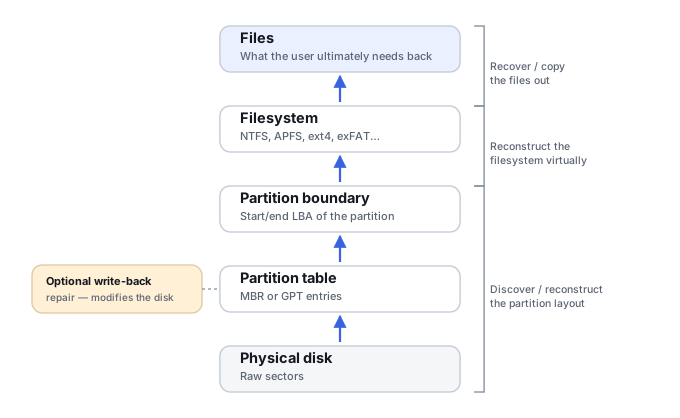
What file recovery actually returns
File recovery exports the files and folders you need to a separate destination. It may rely on file-system metadata (names, directory structure, extents) when that survives, or fall back to content-based carving when it does not — see File-System Recovery vs. File Carving for that distinction. File recovery is not the same thing as a raw sector-level copy, and it does not make an operating system bootable; its only goal is getting the specific content you need onto a destination you control.
Partition recovery vs. file recovery: comparison
Scroll horizontally to see the full table →
| Criterion | Discovery / virtual opening | Partition-table repair | File extraction |
|---|---|---|---|
| Goal | Understand boundaries and open the volume | Restore a layout description for normal access | Preserve the needed content on a separate destination |
| Result | A candidate layout or a virtual volume view in recovery software | A modified partition table on the source | Files and folders on a destination |
| Writes to the source | Not required | Yes | Not required; destination is separate |
| What must have survived | Enough geometry/structure evidence to identify the volume | A verified, trustworthy layout and an accessible volume | Enough mapping, or content suitable for carving |
| Effect on filenames | Does not reconstruct them by itself | Does not reconstruct them by itself | Depends on whether file-system metadata survived |
| Internal file-system corruption | May reveal it | Does not resolve it automatically | Can sometimes work around part of it |
| Multiple candidate layouts | Candidates need to be compared against each other | Writing an ambiguous layout is risky | Export from the validated candidate view, not a guess |
| Bootability | Not guaranteed | Not guaranteed | Not the goal |
How a candidate volume is validated
Finding a recognizable file-system signature is a starting point, not a conclusion — a signature can belong to a previous layout that a later repartition or reformat left behind. A candidate is stronger when several independent things agree: its boundaries line up with other evidence (size, surrounding free space), its size matches what's plausible for the device, the logical sector size used to interpret it matches the source, boot records or superblocks parse as expected, any redundant copies of key structures agree with each other, directory structures resolve consistently, and a sample of actual file contents opens correctly. A tool should not add entries to a reconstructed layout just because a scan turned up a recognizable header somewhere — that header needs the supporting evidence above before it is trusted as a real boundary.
Unallocated, RAW and an unbootable system mean different things
These three symptoms point at different layers and should not be treated as interchangeable. An unallocated region is an address range the current disk-management view does not assign to a recognized partition — this may concern part of a disk or the whole disk, and it does not, by itself, establish whether a previous file system survives there. A Windows RAW volume means Windows found a partition but could not recognize or mount whatever file system it contains (other operating systems surface an unrecognized file system differently); a failed mount by itself does not prove the partition table is damaged, since the file system itself, encryption, or an unsupported format can all produce the same symptom. An unbootable system often points to a bootloader or EFI configuration problem rather than anything about the data volume — a machine that won't boot is not, by itself, evidence that a data partition or its files are lost.
When partition-table repair can help — and when it cannot
Repair is appropriate once you have a verified, coherent candidate layout established on a working copy, and the file system within it is actually readable. In that situation, writing the corrected table back can restore normal mounting, which is convenient when that's genuinely the goal. Repair does not restore data that has already been overwritten, recover encryption keys, reconstruct RAID or LVM mapping on its own, or fix internal file-system structures — it only restores the outer map. Conversely, when the outer map is what was actually missing and the file system inside survived, restoring correct boundaries can reopen a volume that otherwise looked completely inaccessible.
Choose the next step from the evidence
Scroll horizontally to see the full table →
| Evidence | Preferred route |
|---|---|
| Partition missing, file system structures coherent | Virtual open and export; repair is a separate, optional later decision |
| Verified partition boundaries, file-system structures damaged | File-system-level reconstruction, not partition repair |
| Multiple candidates contradict each other | Read-only investigation until one candidate is actually validated |
| Source reads are unstable | Acquisition first, per How to Image a Failing Drive Safely |
| Volume is encrypted | Correct mapping plus access to the encryption key — partition repair alone does not help |
Deleted GPT entry, file system intact
Disk shows as unallocated; the partition entry is gone from the GPT.
Only the outer map is missing; surviving file-system structures can confirm the volume's actual boundaries.
Reconcile candidate boundaries against surviving metadata, open the volume virtually, verify a sample of files.
Export what's needed first; writing the table back is a separate decision made afterward, not a prerequisite.
RAW NTFS volume, partition entry present
Windows reports the volume as RAW; the GPT/MBR entry for it is still there.
A partition entry is present, but its start and size still need verification. If the boundaries are correct, investigate the file system, encryption state and access path rather than assuming that rewriting the partition table will help.
Check the entry's boundaries against surviving volume structures on a copy, then investigate the lowest layer that remains inconsistent. Do not rewrite the GPT or MBR merely because Windows reports RAW.
Confirm which layer is actually damaged before choosing a repair path.
Repartitioned, quick-formatted HDD
A scan finds both the old and the new file-system signatures on the disk.
A signature alone is not sufficient evidence; some of the old metadata or content may already be overwritten by the new layout.
Treat each candidate view separately and check its own evidence rather than merging signatures into one assumed layout.
Verify recovery output independently for each view before relying on either.
Truncated image or changed USB bridge
Boundaries that should be present (e.g. a backup GPT) appear missing or inconsistent after re-imaging through different hardware.
A capacity or logical-sector-size mismatch between the original acquisition and the current view can distort apparent boundaries without the disk itself having changed.
Compare acquisition geometry (capacity, sector size) against the original before concluding anything was destroyed.
Re-check boundary evidence once geometry is confirmed consistent.
A short checklist before you write a repair
Before writing a partition-table repair, confirm each of the following: the evidence agreement described above actually holds for this specific candidate; the sector geometry has been checked against the notes below; a representative sample of file content has been verified, not just a recognizable signature; any files you actually need have already been exported; a preserved copy exists; and the scope of the intended change is understood. This checklist does not repeat the directory- and content-level checks already covered above — it only confirms they were actually done. If any of those is missing, stay in read-only investigation rather than writing a repair. Repair is not required even after a successful export — for a pure data-recovery case it can be entirely unnecessary. If the actual goal is restoring bootability, that is a separate system-repair task where the partition table is only one of several things that need to be correct.
Overlapping candidates and geometry
A disk can carry evidence of more than one historical layout at once — a repartitioned or previously-reused disk can show several candidate boundaries or multiple file-system signatures. Consistency has to be checked within one coherent layout at a time, not by merging every signature found anywhere on the disk into a single table. Converting an address from LBA to a byte offset depends on the logical sector size the layout is being interpreted with: the same LBA number means a different byte offset under 512-byte and 4096-byte sector presentation. That is a reason to record and check sector geometry explicitly — it is not an instruction to rewrite boundaries based on this article. Size, UUID/GUID and file-system signatures are useful, independent-feeling clues, but none of them is absolute proof on its own; a previously valid file system can partially survive a repartition and still present a plausible-looking but stale candidate. RAID, LVM, encryption and other container layers sit below a direct partition/file-system interpretation and need to be resolved on their own terms — a signature found by scanning an assembled multi-disk volume is not grounds for writing a partition table onto one individual RAID member.
Technical references: TestDisk documentation (partition search, structural repair and file copying are described as separate operations, with file-system support varying by operation) · UEFI GPT specification (primary/backup header and partition-entry structures). CRC and header agreement confirm structural consistency, not that a layout is the one actually wanted, or that the files inside are intact.
Related: Partition Table Recovery and Filesystem Discovery · Drive Shows as "RAW" · Partition Loss · File-System Recovery vs. File Carving · Logical vs. Physical Data Recovery · Repair vs. Recovery · How to Validate Recovered Data.