NAS Device Failure
When a NAS stops responding, it's easy to assume the drives inside have failed together — but a NAS can become inaccessible even when its member disks are perfectly healthy. Enclosure, OS/management, array/pool, file-system and member-disk failures need to be separated before assuming which one actually happened.
NAS failure: what should you do next?
Answer one question about the current state. The result suggests the safer next step rather than diagnosing the failure.
Are all original drives still available and has the NAS avoided reset, pool recreation or rebuild attempts?
Document and preserve the member set.
Record bay order, pool/RAID state and appliance messages. If data is important, image questionable members before reconstructing the storage stack.
Do not make further configuration changes.
A changed array state can contain multiple generations of metadata. Preserve all original and replacement members plus logs before deciding which state is authoritative.
This guide classifies the next recovery action from observable information. It does not diagnose hardware condition or estimate a percentage chance of recovery.
What's actually happening
A NAS is effectively a dedicated small server: it runs its own operating system — Synology's DSM, QNAP's QTS, and similar — which manages the RAID, pool or hybrid-storage layer, the file system sitting on top of it (commonly standard Linux technologies such as ext4 or Btrfs, sometimes combined with vendor-specific management metadata), and the services that expose the storage over the network. If that management layer corrupts, the NAS's motherboard fails, or a firmware update goes wrong, the whole unit can stop responding even though every drive inside is completely healthy.
How recoverable this really is
Recoverability depends on whether the failure is limited to the NAS appliance or also involves the disks, array metadata, pool or file system. Many NAS layouts are built from recognizable Linux storage technologies, but vendor-specific assembly rules, metadata and features such as Synology SHR can still matter. A dead enclosure with healthy members is therefore very different from a degraded pool with unreadable disks.
First determine which layer has actually failed
“The NAS is down” describes a symptom, not a storage diagnosis. The failure can be in the enclosure or power supply, the NAS operating system, the RAID/pool layer, the file system, or one or more physical drives. Network access can also fail while the underlying volume remains intact.
- Appliance failure: the NAS does not boot or cannot be reached, but the member disks may be healthy.
- Degraded storage: the NAS reports a failed member or degraded pool but data may still be accessible.
- Pool or volume failure: all expected disks may be present while the storage pool or file system no longer assembles or mounts.
- Changed configuration: reset, migration, disk replacement or attempted pool recreation may have altered metadata after the original incident.
What you can document safely
Before resetting or moving disks, capture the NAS model, firmware version if available, bay order and disk serial numbers, storage-pool/RAID status, volume status, warning messages and system logs. If the web interface is still available, screenshots are useful. If disks are removed, label them by their original bay rather than by the order in which they happen to be connected to another computer.
Do not assume that moving the drives to another NAS of the same brand is automatically non-destructive. Migration procedures differ between vendors and models, and an appliance may offer initialization, repair or upgrade steps that write metadata. A replacement enclosure can be useful only when its expected behavior for that exact storage configuration is understood.
NAS recovery often requires reconstructing several layers
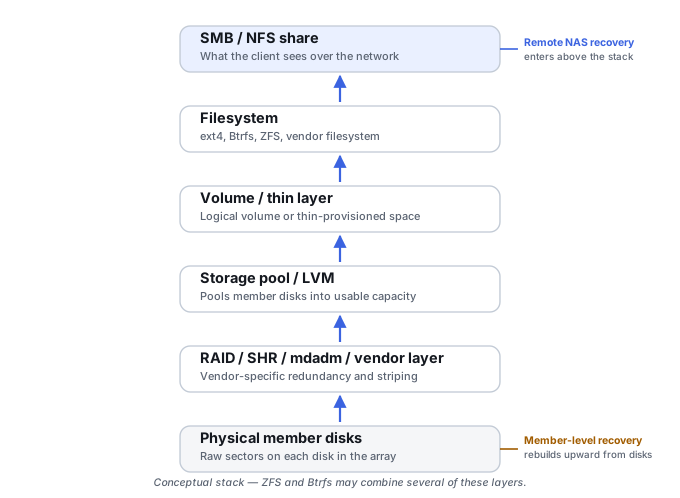
A typical path can involve physical member access, RAID or hybrid-array assembly, LVM or another volume-management layer, and finally ext4, Btrfs or another file system. Snapshots, thin volumes, encryption and vendor-specific metadata can add further layers. Each layer should be identified before flattening or repairing the next one; otherwise useful allocation or historical metadata can be lost.
Keep the problem in this NAS Case when RAID, LVM/pools, Btrfs/ZFS, snapshots or LUNs belong to an appliance-specific stack whose assembly rules depend on the NAS platform. Use Storage Pool or Composite Volume Failure when the missing object is a local/general-purpose pool such as Storage Spaces, Dynamic Disks or standalone LVM rather than a NAS appliance state.
Synology SHR may involve more than one RAID array
Synology’s own documentation describes SHR as potentially consisting of multiple Linux MD RAID arrays joined into one storage pool through LVM. A mixed-capacity NAS — say, two smaller drives and two larger ones — can end up with a common-capacity RAID 5 array across all four disks plus a second, smaller RAID array over the extra space on the larger pair, the two combined by LVM before Btrfs or ext4 sits on top. SHR is not simply an unusual RAID 5: recovery has to identify and reconstruct every underlying array, not just the first one found. See Reconstructing NAS Storage Stacks for the full model, including why disks from the same NAS commonly carry more than one RAID signature (a small system array alongside the data array).
QNAP QTS and QuTS hero are different recovery architectures
QNAP’s two operating systems should never share one recovery recipe. QTS is built from RAID groups, storage pools, and static, thick or thin volumes — each with a different dependency chain, and a thin volume in particular depends on allocation metadata that is itself recovery-critical: ignoring it and treating the parent pool as a flat, fully allocated address space can produce incomplete or misleading results. QuTS hero is ZFS-based instead, with pools, checksums, transaction groups and copy-on-write snapshots that behave nothing like a generic ext4 QNAP array. Confirm which one is actually running before assuming either recovery path applies, and see Reconstructing NAS Storage Stacks for the QTS/QuTS hero split in more detail.
Snapshots on either platform typically preserve a mapping to shared blocks, not automatically a second physical copy of the data — deleting snapshot metadata can free the historical blocks it was holding onto, and a snapshot taken after corruption already occurred simply preserves the corrupted state. See LUN, Thin Provisioning and Snapshot Recovery for how that plays out in practice, including the difference between a crash-consistent and an application-consistent snapshot.
The general approach
Recovery may use the original appliance, a compatible platform, or external reconstruction from preserved member images, depending on which layer actually failed. Do not remove the disks merely because the NAS is inaccessible: first preserve bay and member identity, and determine whether the appliance itself still contains useful metadata or a safer read path before pulling anything. Once a physical-reconstruction path is actually needed, vendor-specific layout knowledge, or in some cases a replacement unit of the same model once the drives themselves are confirmed healthy, fills in whatever proprietary logic is required — but this is not always the safest first action, particularly for encrypted NAS volumes, proprietary appliance state, an otherwise-healthy appliance where an export or snapshot is safer, systems that need controller or enclosure context, and enterprise multi-enclosure systems.
Don't factory-reset, initialize, recreate the storage pool, or reinstall the NAS operating system as an experiment when the data is the priority. The exact effect varies by vendor and model, but these actions can rewrite system, array or volume metadata and make later reconstruction harder.
If the NAS storage pool itself has lost redundancy or members, also read RAID Array Failure and Failed or Interrupted RAID Rebuild. If any of the pulled drives are also struggling to read reliably, imaging them first with purpose-built imaging hardware is worth doing before attempting reconstruction · Understanding Storage Layers Before Recovery · Reconstructing NAS Storage Stacks · LUN, Thin Provisioning and Snapshot Recovery · RAID, NAS and SAN Reconstruction Tools · Drive Cages & RAID Enclosures.
This page describes the general situation, not a guaranteed fix for your specific case. If you'd rather have someone experienced take a look before you try anything, see what a hands-on evaluation looks like.