Storage Pool or Composite Volume Failure
All the member disks can still be present and readable while the storage pool, virtual disk or composite volume that used to join them into one logical address space no longer assembles. A visible disk is not the same thing as a reconstructed volume, and repairing, resetting or recreating the pool before that distinction is clear can overwrite the very metadata a recovery would need.
Storage pool or virtual disk failed: what should you do next?
Answer one question about the current state. The result suggests the safer next step rather than diagnosing the failure.
Are all original member disks still connected and reading normally, and has no repair, reset or recreation already been attempted on the pool?
Reconstruct the pool virtually before exposing a file system.
“Apparently stable” only means that the members are connected and reading without warning signs so far; it is not a health diagnosis. Record the current pool and member state, then confirm that the same logical blocks would be presented in the same order as before the failure. Only once that mapping is trustworthy is analyzing a partition or file system on top of it useful.
Do not repeat a repair, reset or recreation attempt.
A missing member or an already-attempted repair can leave more than one generation of pool metadata behind. Preserve every member exactly as it is now and identify which metadata generation is authoritative before anything else touches the pool.
This guide classifies the next recovery action from observable information. It does not diagnose hardware condition or estimate a percentage chance of recovery.
What's actually happening
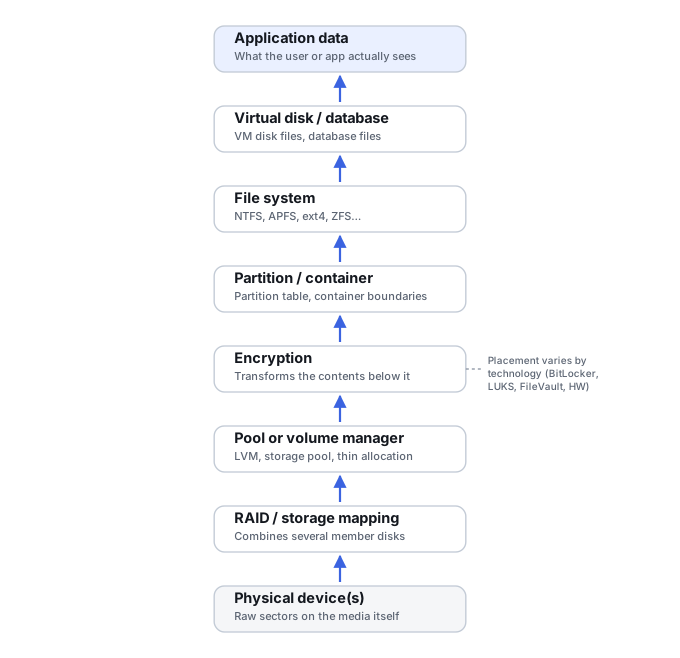
A storage pool, virtual disk or composite volume is a mapping layer sitting above the physical member disks: member devices belong to a pool, the pool tracks their membership and state, an allocation, stripe, mirror, parity or extent map decides how logical addresses correspond to physical ones, a virtual disk or logical volume exposes that mapping as one addressable object, and a partition and file system are built on top of that. Microsoft's own documentation for Storage Spaces describes pool health, virtual-disk health and physical-disk health as three separate, independently reported states — a pool can show every physical disk as healthy while the virtual disk built from that pool is degraded, incomplete or detached. Not every technology implements every one of these layers identically, but the general shape — several physical devices depending on metadata that maps them into one logical address space — is common to Windows Storage Spaces, Windows Dynamic Disks, Linux LVM, and integrated systems such as ZFS or Btrfs.
| Situation | Main question |
|---|---|
| Conventional RAID member/layout problem | Is RAID geometry or member state wrong or incomplete? — see RAID Array Failure |
| Interrupted RAID rebuild | Which address ranges belong to which generation? — see Failed or Interrupted RAID Rebuild |
| Vendor NAS stack | Which RAID, pool, vendor or file-system layer failed? — see NAS Device Failure |
| Local or composite pool (this Case) | Can the pool or virtual-volume mapping be reconstructed? |
| SAN or LUN | Is presentation, LUN mapping or thin allocation intact? — see SAN Failure |
A visible member set is not yet a recovered volume
Physical disks can all be readable while the relationship among their extents is still unknown, stale or inconsistent. Evidence that all expected members belong to the pool does not by itself prove that the currently selected allocation, extent, stripe, mirror or parity mapping is the correct generation needed to reconstruct the original logical address space. Seeing every expected disk is a reasonable starting point, not confirmation that anything has been reconstructed.
Pool state and filesystem state are different
A missing or unreadable file system on top of a pool may be a secondary symptom rather than the actual problem. Repairing or reformatting a file system before the pool and virtual-disk mapping underneath it is known to be correct risks writing new structures onto a logical address space that was never properly reassembled in the first place. The reader has to first establish that the same logical blocks are being presented in the same order as before the failure, and only then treat what sits above that mapping as an ordinary file-system question.
What changes the recovery outlook
- How many members are unavailable, and against what resilience and layout. A mirrored or parity-protected pool can tolerate some member loss; a simple striped pool generally cannot.
- Whether surviving pool metadata copies agree. Some pool and volume-manager technologies retain multiple metadata copies, records or generations. When they disagree, the newest-looking copy is not automatically the authoritative recovery state; consistency with the member set and expected logical layout must be established.
- Whether a repair, rebalance or rebuild was already started. A partially completed operation can leave the pool in a state that matches neither the old nor the new configuration cleanly.
- Thin or sparse allocation, discard and reclamation. A thinly provisioned virtual disk depends on an allocation map that is itself part of what needs to be recovered, not something implied by the pool's stated capacity.
- Encryption. An encrypted pool or volume adds a key dependency on top of the mapping problem.
- Read errors on underlying members. A member that is nominally present but unstable under sustained reads changes the situation from a metadata problem into an acquisition problem as well.
Technology notes: Storage Spaces, Dynamic Disks, LVM, ZFS and Btrfs
Microsoft's current documentation for Storage Spaces is the clearest mainstream example of this layering: physical disks belong to a storage pool, virtual disks are created from pool space, volumes sit above virtual disks, pool metadata is written to the pool's own drives, and pool, virtual-disk and physical-disk health/operational states are tracked separately. Microsoft's troubleshooting material can recommend repairing or resetting a pool as ordinary administration intended to return storage to service — that is a different goal from preservation and reconstruction intended to recover data from the pool's existing state, and the two should not be confused. Windows Dynamic Disks are a simpler but conceptually similar case of disk-to-logical-volume metadata dependency. Linux LVM is a further example: physical volumes, volume groups and logical volumes are joined by extent mapping and, depending on configuration, metadata history that a Method page can cover in more depth than a Case page should. ZFS and Btrfs integrate allocation, redundancy and file-system metadata more tightly than a conventional RAID-plus-volume-manager stack, so forcing them into that same layering model is misleading — the practical recovery rule stays the same regardless: reconstruct the correct logical view before treating a mount failure as ordinary file-system corruption.
What you can document safely
Before changing anything, record the exact member inventory and serial numbers, connection order and ports, each disk's reported capacity, the pool and virtual-disk names or IDs shown by the operating system or management tool, screenshots of current status, a configuration export if the tool offers a read-only one, relevant event logs, which device disappeared and when, and whether any repair, add, remove or reset operation has already been run. This is observational work; it does not require running write-capable repair commands as a diagnostic step.
The safer recovery path
Preserve
Preserve the member set. Prioritize imaging any unstable member, and when feasible work from images of all members so reconstruction and later tests do not modify the originals.
Record state
Capture the current pool and member configuration as found.
Reconstruct
Rebuild the pool virtually, or from images, without writing to the originals.
Verify mapping
Confirm expected logical capacity, member/extent mapping and consistency of the reconstructed address space before exposing the upper layer.
Expose the volume
Present the reconstructed virtual or logical volume as a source.
Analyze above it
Only now examine partitions and file systems on top.
Recover elsewhere
Extract files to separate, healthy storage.
Validate
Check recovered data against what the volume should contain.
Don't repair, reset or recreate the pool as a way to test whether it still works, and don't treat a file-system scan of individual pool members as equivalent to reconstructing the pool. Seeing every member disk does not mean all data is present, the largest plausible virtual volume a tool proposes is not necessarily the correct one, and not all metadata copies on a pool necessarily represent the same generation.
This Case covers the pool or composite-volume mapping layer specifically; if the underlying problem turns out to be conventional RAID geometry or a stalled rebuild, see RAID Array Failure and Failed or Interrupted RAID Rebuild. If the storage sits inside a vendor NAS or a SAN, see NAS Device Failure and SAN Failure instead, since vendor-specific assembly rules change the answer. Once a volume mounts, ordinary file-system problems are covered in File System Corruption, and a device reporting the wrong capacity has its own guide at Drive Shows the Wrong Capacity · Understanding Storage Layers Before Recovery · Storage Metadata Generations and Consistency · RAID Metadata, Member State and Foreign Configurations · Sparse, Thin-Provisioned and Virtual Storage · Validating Recovered Data.
This page describes the general situation, not a guaranteed fix for your specific case. If you'd rather have someone experienced take a look before you try anything, find a recovery provider by region.