RAID Disks Removed and Their Order Is Unknown
Losing track of which bay each disk came from does not by itself destroy any data. Many RAID implementations record array identity and each member’s role in on-disk metadata, and the member data carries further clues. What has to be re-established — each disk’s logical role, the layout, and which generation of the array each disk represents — should come from that combined evidence, examined on copies, not from trying disk orders on the original controller. Automatic detection sometimes gets there; it is not guaranteed to.
RAID disk order unknown: what should you do next?
Answer one question about the current state. The result suggests the safer next step rather than diagnosing the failure or confirming any disk order.
So far, have the disks you are working from been free of health or access warning signs — read errors, unusual noises, very slow responses, dropouts or timeouts? A full surface test is not needed to answer; answer from what has been observed.
Preserve each disk, then test candidates on the copies.
“Apparently stable” only means that no warning signs have been observed so far; it is not a health diagnosis. Keep every potentially relevant disk, the records and the history of what was done, then image the disks with a controlled method suited to their access, any unlock dependencies and their health, and stop if warning signs appear during imaging. Read each member’s metadata and build candidate layouts virtually on the images; treat any proposed order as a hypothesis until it validates across the whole address space. A spare or earlier-removed disk that has not been checked yet does not have to be read in full before work starts: record its state as unknown and plan its assessment separately.
Stop broad reads and order experiments; assess health and plan acquisition first.
A disk with warning signs, or one whose condition is not yet known, needs a health assessment and an imaging plan before any analysis that reads it end to end; a disk with active failure symptoms such as clicking, repeated dropouts or growing errors should be treated as critical-risk and handled only by careful imaging. The concern applies to the disks it concerns: an unknown state of one separately delivered spare or former disk is a reason to plan its assessment, not proof that the whole set is in critical condition. Keep every disk and record as they are now.
This guide classifies the next recovery action from observable information. It does not diagnose hardware condition, identify the correct disk order or estimate a percentage chance of recovery.
This applies to both answers above, whether or not the disks show warning signs. If disks were initialized, formatted, re-created, imported, cleared or rebuilt since removal, or the system was started with the disks in a guessed order, record what was done, to which disk and when, and make no further writes to any of them. The question has then become which generation each disk holds, not only where it sat: a disk can be healthy and still carry rewritten metadata or data, so candidates have to account for changed generations.
What's actually happening
A RAID array is defined by more than the set of disks in it. Each member holds a particular role in a particular layout, and each one also reflects a particular point in the array’s history. When disks are pulled from a server or NAS without photos or labels, the physical record of where they sat is gone — but bay positions alone are not sufficient proof of logical member roles and current state, even though for some controller layouts the physical record is an important part of the layout evidence. The useful question is which evidence still survives on the disks, the controller and the surrounding records, and how much of the array it can actually confirm.
That is why the outlook ranges widely. Where every member is readable and carries intact, mutually consistent metadata, roles can sometimes be read directly. Where metadata is missing, vendor-specific or contradictory, or where one disk has a different history from the others, roles and layout have to be inferred and then validated, and some of them may stay unconfirmed.
“Order” means several different things
Four numberings are easily confused, and they do not have to agree:
- Physical bay or slot — where a disk sat in the chassis or enclosure.
- Host or controller enumeration — the port, device name or ID the controller or operating system assigned, which can change after re-cabling, re-enumeration or controller replacement.
- Logical role in the array — the position the array’s own metadata assigns to that member. In Linux md, for example, a member’s slot “gives the role that the device has in the array”: a position number, or none for a spare or failed device (Linux md admin guide, “MD devices in sysfs”).
- Position in a candidate layout — where a particular reconstruction hypothesis places the disk. It stays a hypothesis until validated.
What a role means also depends on the RAID level and the implementation. Member order matters for striping and parity rotation; in a mirror the main question is which copy is current. The familiar picture of RAID 10 as striped mirror pairs is one layout, not every RAID 10: Linux md, for instance, offers near, far and offset arrangements in which copies sit at similar or very different offsets on different devices (mdadm(8), RAID10 layout options). Likewise, some implementations identify members from metadata rather than bay position — mdadm, for example, considers only devices whose md superblock contains the right array identity when assembling (mdadm(8)). That is a property of a specific implementation, not a reason to assume any controller or NAS will sort shuffled disks out on its own. The separate fields worth keeping for each disk are set out in Bay order is a clue, not proof.
Preserve whatever context is left
Before anything else changes, gather and keep:
- Every potentially relevant disk — current members, the original disks that were replaced, replacement and spare disks, and any disk removed earlier. A disk that looks surplus can be the only source of a region or of an earlier state.
- Physical traces — carriers or trays, any labels already on disks or trays, and photos of the chassis, even if they show only part of the picture.
- System records — controller or NAS configuration exports, logs, alert e-mails, support bundles and screenshots that already exist, plus serial numbers read from each disk.
- A chronology of actions — who removed what, when, why, and what was done to any disk since (reinserted, connected elsewhere, initialized, scanned).
- Existing images or clones, with whatever read-error maps or logs came with them.
Keep the owner’s or technician’s recollection of the order as its own clearly labelled item, not as a confirmed fact, and do not add labels from memory that will later look like they were recorded at removal time. Where a value is not known, “unknown” is a better record than a guess. If a disk is slow, clicking, disconnecting or reporting errors, stop broad reads of it and treat it as a health and acquisition question first, before any order analysis that would read it end to end. For future arrays, Documenting a Multi-Disk System Before Drives Are Removed describes the record that prevents this situation; here it serves to organize what still exists, and it does not call for reinstalling the disks to recreate a record.
What can support or rule out a candidate
No single source settles the order in every case. Each type of evidence answers a narrower question than it first appears to:
Scroll horizontally to see the full table →
| Evidence | Useful for | Limitation |
|---|---|---|
| On-disk RAID metadata: array identity, member role, data offset, counters | Grouping disks into an array, reading a recorded role directly, and locating where array data starts on each member | Format- and implementation-specific; a stale member keeps its old metadata, and a counter is not a universal timestamp. The newest-looking metadata on one disk is not automatically consistent with the others |
| Controller or NAS configuration, logs and support exports | Recorded member list, serials, slot assignments, rebuild and replacement events | Reflects the moment it was written; bay or port numbering may have changed since, and the record may not cover the last events before removal |
| Data offsets and partition patterns on each member | Distinguishing a member’s first chunk from others, and spotting a disk that never belonged to this array | Members of the same array often look alike at the start; this narrows candidates more often than it fixes one |
| Structures that span members: file-system metadata, checksums, large files | Testing whether a candidate order and chunk size produce coherent content across stripe boundaries | Results near the start of the array prove little about the rest; regions with few distinctive structures can stay ambiguous |
| Parity consistency, for layouts that have parity | Ruling out candidates whose stripes do not add up, and supporting ones that do | Parity checks agreement within a stripe, not order uniqueness or freshness: more than one arrangement can pass in some regions, and an older but internally consistent stripe passes as well as a current one |
Matching model and capacity do not establish membership: identical disks from the same purchase can belong to different arrays, and a replacement may differ in model while being a legitimate member. How to compare metadata generations when they disagree is covered in Storage Metadata Generations and Consistency.
The right geometry with a stale member is still wrong
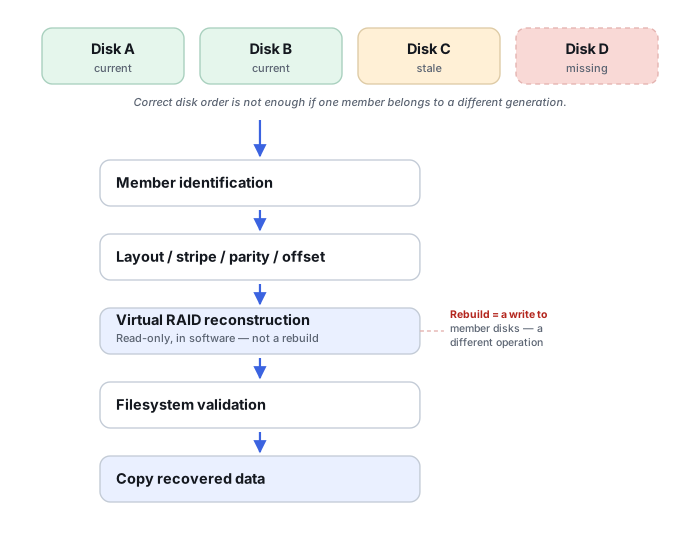
Order and layout are only half of the problem. Each disk also needs a state hypothesis of its own: current member, original member that left the array at some point, replacement, or partially rebuilt member. A disk can sit in exactly the right logical position and still describe an earlier generation of the array, because it dropped out or was swapped while the others kept receiving writes. Treating such a disk as current makes its sectors look valid while they quietly represent the past.
A partially rebuilt replacement is a special case of the same problem: it can be correct for some address ranges and not others. Linux md, for example, keeps a recovery_start value that, for a device not yet in sync, records how many sectors from its start are known to be correct (Linux md admin guide, “MD devices in sysfs”); other implementations track this differently or not in a form that survives removal. Region-by-region reasoning for that situation is covered in Recovering After an Interrupted RAID Rebuild.
Three distinctions are worth keeping explicit. A role that cannot be confirmed is recorded as unknown, not filled in from the most plausible guess. A missing member and a readable member from the wrong generation are different problems; the second is often harder to notice. And where an image has unreadable areas, its coverage belongs in the record: a region filled with zeros by the imaging process is an acquisition gap, not array content, and hiding it makes a candidate look more complete than it is.
Illustrative example: identical disks, one with a different history
All disks from a parity array read normally and share the same model and capacity. One of them was installed as a replacement some time before removal, and nobody is sure whether its rebuild finished. The tray stickers show bay numbers, but the trays were also handled during removal.
Restoring the sticker order would at best reproduce the physical positions. It would not show whether the replacement holds current data across its whole surface, part of it, or none of it. A candidate built on that assumption could mount and still mix generations.
Image all disks, read each member’s metadata, and keep the replacement’s state as an open hypothesis. Compare candidates with and without the replacement treated as current, and test where they differ.
Some regions may not show a clear difference, and the replacement’s rebuild extent may remain partly unconfirmed. That uncertainty is recorded rather than resolved by assumption.
Test candidates on copies, not on the original array
Candidate layouts are assembled virtually, in software, from preserved images or protected working copies of every member. For each candidate, keep a note of the parameters tried (member roles, chunk size, offsets, parity rotation, and which disk is treated as which state) and the evidence that supported or contradicted it. Validation then needs to reach well beyond the start of the array: structures and files from different regions, large files that cross many stripes, and file-system or application-level consistency checks. A successful mount or a convincing folder tree is not enough, because a wrong order or chunk size can still produce readable metadata near the beginning (see Validate across the address space and How to Validate Recovered Data).
Running full-surface reads for every possible permutation directly against original disks multiplies wear on any disk that is already marginal; on images, the same comparison costs nothing to the originals. The outcome is also not all-or-nothing. Depending on the layout and what validates, individual files or regions can sometimes be recovered and verified even when the whole array cannot be confirmed, provided the result is labelled with what was and was not validated.
Which next step fits your situation
The interactive check above separates disks with and without observed warning signs; the note on earlier writes after it applies to both. In more detail:
Scroll horizontally to see the full table →
| Situation | What it means | Safer next step |
|---|---|---|
| No health or access warning signs seen so far on the disks you are working from | Nothing observed argues against controlled acquisition; this is a limited observation, not a health diagnosis | Preserve disks and records, image every disk, then read metadata and test candidates read-only on the copies; plan the assessment of any spare or former disk not yet checked |
| A disk is slow, noisy, disconnecting or reporting read errors, or its condition is not yet known | Order analysis would put the weakest disk under repeated full reads | Stop broad reads; assess health and plan careful imaging of that disk before any analysis |
| Disks were reinserted in a guessed order and the system started, or an initialize, format, create, import, clear or rebuild has run | Metadata or data may have been rewritten, so the disks can now hold more than one generation, whether or not they show warning signs | Stop writes; record what ran, on which disk and when; preserve every disk as it is now and account for changed generations |
| The array or its disks depended on controller encryption or another unlock factor | Correct order does not help if the data cannot be unlocked off the original platform | Preserve the controller and its key records too; see Self-Encrypting Drives and Controller Encryption in RAID and NAS and Drives Unreadable After Removal From a Server or NAS |
| Metadata is missing, vendor-specific or contradictory, or the layout is unfamiliar | Roles must be inferred and the available tools may not model this layout | Consider a specialist with experience of that platform before further experiments |
What not to do, and when a specialist makes sense
Do not reinstall the disks in a guessed order and boot the original controller or NAS “to see what it accepts”, and do not initialize members, create a new array over them, clear or import a foreign configuration, or start a rebuild as a way of finding the order. These are configuration and maintenance operations, not read-only diagnosis. Dell’s guidance for its PowerEdge RAID controllers, for example, describes a foreign configuration as one detected when the controller identifies RAID metadata on disks moved between systems, and warns that importing one at the wrong time may result in data loss (Dell KB 000122457). Other controllers use their own terms and rules; this is one vendor’s documented behavior, not a general description. Even where an implementation can assemble members by metadata, a forced or automatic assembly that treats an out-of-date member as current can write new state over the evidence.
Losing the bay labels does not by itself make this a professional-only case: with disks that show no warning signs, consistent metadata and a supported layout, a careful read-only analysis on images can be enough. A specialist becomes the sensible next step when a disk shows health problems, the layout or controller format is not supported by the tools at hand, metadata generations conflict, or the data depends on unlock factors that are not available outside the original system.
Don’t search for the right order by rearranging disks in the original enclosure and powering up the controller or NAS after each attempt. A configuration it accepts is not proof of the correct order or the current generation, and one wrong acceptance followed by an initialize, rebuild or resync can overwrite the evidence that would have identified the correct order. Preserve the disks as they are, and test orders on images.
For RAID failures where the member order is known, start with RAID Array Failure; if a rebuild was already running or interrupted, see Failed or Interrupted RAID Rebuild. When drives were removed and now cannot be read at all outside the original system, see Drives Unreadable After Removal From a Server or NAS. Imaging a struggling member before any of this is what professional imaging hardware is built for · RAID Reconstruction Basics · RAID Metadata, Member State and Foreign Configurations · Storage Metadata Generations and Consistency · Recovering After an Interrupted RAID Rebuild · How to Validate Recovered Data · Documenting a Multi-Disk System Before Drives Are Removed · RAID, NAS and SAN Reconstruction Tools.
This page describes the general situation, not a guaranteed fix for your specific case. If you'd rather have someone experienced take a look before you try anything, find a recovery provider by region.