SAN (Storage Area Network) Failure
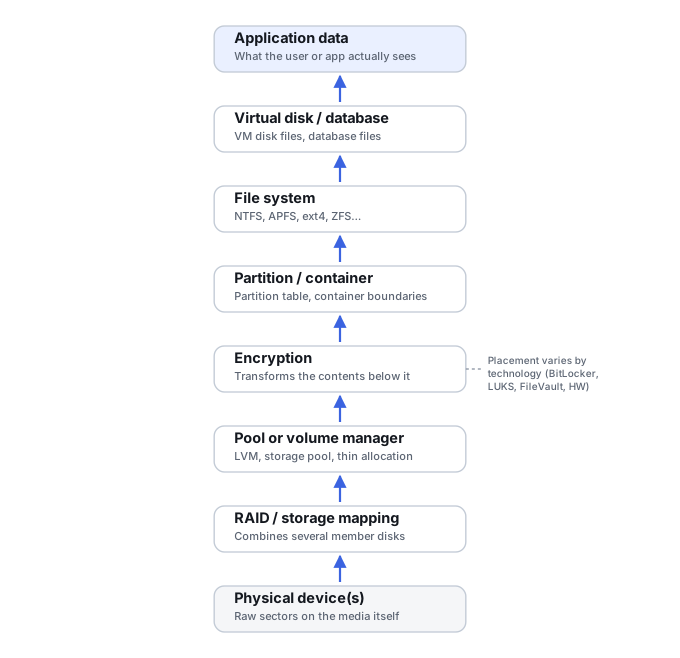
A SAN failure rarely means a single thing went wrong. It usually means a failure occurred somewhere in a stack of several layers — physical disks, a RAID or erasure-coding layer, LUN presentation, and often a file system or database on top of that — and recovery starts with figuring out which layer actually broke.
SAN failure: what should you do next?
Answer one question about the current state. The result suggests the safer next step rather than diagnosing the failure.
Is the pool/LUN state still changing through rebuilds, failover, initialization, repair or active writes?
Stabilize the storage state before recovery.
Preserve controller logs, pool/LUN mappings, thin-provisioning metadata, snapshots and member state. Avoid additional write-capable recovery actions until the failure sequence is understood.
Reconstruct the storage layers from preserved state.
Document mappings and acquire the layer that still preserves useful allocation information. Thin and virtualized storage should not be flattened prematurely.
This guide classifies the next recovery action from observable information. It does not diagnose hardware condition or estimate a percentage chance of recovery.
What's actually happening
A Storage Area Network presents "LUNs" (logical units) to servers as if they were plain disks, but the stack underneath a host-visible LUN is platform-specific: it can be backed by one or more array or storage-system layers such as RAID or erasure coding, pools, thin provisioning, snapshots or clones, deduplication, controller and cache state, and presentation metadata, and depending on the platform that may mean a traditional SAN controller, external arrays, software-defined storage, a virtualized backend, or multiple controller/enclosure layers rather than one single "SAN controller." A failure can originate at any layer — a controller malfunction, a firmware bug during an update, multiple physical disk failures exceeding what the underlying redundancy tolerates, or corruption introduced by the SAN's own management software — and each layer requires different expertise to diagnose and reverse.
How recoverable this really is
Depends entirely on which layer failed, and how far that's already been compounded by follow-up troubleshooting. If payload data remains intact and the missing mapping or presentation metadata can be reconstructed, recovery may be possible; if allocation metadata or member data is also lost, the problem becomes materially harder — similar in kind to the harder end of RAID array failure but at a larger scale, with vendor-specific complexity layered on top.
Map the storage stack before trying to recover a LUN
A host-visible LUN may be several abstraction layers away from the physical disks. A useful incident map therefore starts at the application or host volume and works downward through file system, partitioning or volume manager, LUN, snapshot/clone relationships, thin or deduplicated allocation, storage pool, RAID/erasure set, controller and physical members. Losing one mapping layer can make intact lower-level data appear meaningless.
This is also why “image the disks and scan them” is not a universal SAN strategy. Imaging physical members can be necessary when hardware is unstable, but a higher logical layer may preserve allocation information that is essential to reconstruct thin, sparse, deduplicated or virtualized storage efficiently.
Recovering the LUN is not recovering the VM or database
Many SAN-backed workloads add still more layers above the LUN itself: a VMFS datastore, then a VMDK, then a guest file system, then the actual database or files inside it. Each of those layers carries its own metadata and, often, its own snapshots — a VM-level snapshot has a delta/parent chain entirely separate from any snapshot the array took of the LUN, and VMware is explicit that snapshots are not backups. Preserve LUN identity carefully before reconstruction: LUN ID and UUID/WWN, target IQN and initiator IQNs or FC WWPNs, host groups and LUN masking, controller owner, multipath identifiers, and the host-side disk signature, partition GUID, or VMFS UUID, where the platform actually exposes them — not every identifier listed here exists, or is equally authoritative, on every platform. These are what let a later recovery map the application back down to the physical pool. See SAN Storage Stack Reconstruction and LUN, Thin Provisioning and Snapshot Recovery for the full picture.
This Case covers array-side failures: LUN presentation, thin provisioning, snapshots and other storage-system-side problems on the array itself. A composite volume built from a host operating system's own volume manager — Windows Storage Spaces or an LVM/mdadm stack the host assembles from LUNs or disks it sees — is a different failure surface with its own metadata and recovery model; see Storage Pool or Composite Volume Failure for that host-side case.
What changes the recovery outlook
- Which layer is damaged. Loss of a host file system is fundamentally different from loss of pool-allocation metadata or multiple physical members.
- Thin provisioning and deduplication. Logical blocks may not have a simple fixed physical location, so allocation metadata can be as important as the data extents themselves.
- Snapshots, clones and replication. These may preserve useful historical blocks, but only if their dependency and allocation metadata remain intact.
- Cache state and power-loss protection. A sudden outage can leave recent acknowledged writes dependent on controller-cache behavior and protection mechanisms.
- Actions taken after the incident. Pool repair, LUN recreation, firmware changes, forced member states or new allocations can overwrite metadata needed to understand the earlier state.
What to preserve before intervention
Export or capture controller and enclosure logs, event timelines, disk/member identifiers and slots, pool configuration, RAID sets, LUN identifiers and mappings, thin-provisioning state, snapshot/clone relationships, replication state and relevant host-side information. Record what changed immediately before and after the failure. If vendor support is involved, preserve support bundles and diagnostic output before authorizing write-capable procedures.
For a multi-controller system, note controller ownership, failover events and cache/battery or capacitor warnings as well. These details can distinguish a presentation or controller problem from an actual loss of storage data.
The general approach
Start by preserving the current state and documenting the storage stack: controller status, disk/member state, pool or RAID layout, LUN mappings, thin-provisioning and snapshot configuration, recent events, and any cache or power-loss condition. Vendor diagnostics can be extremely useful, but they should be collected without accepting reinitialization, rebuild, firmware, or destructive repair actions. If reconstruction is required, platform-specific knowledge may be necessary because allocation maps, metadata, deduplication, thin provisioning, and controller behavior can be proprietary.
Don't reinitialize pools or LUNs, force failed members online, start an uncertain rebuild, clear configuration metadata, or apply firmware simply as a troubleshooting experiment. Some automated recovery actions are normal for a healthy redundant system, but once the storage state is inconsistent, every write-capable action should be evaluated against the possibility that the current metadata and member set are no longer trustworthy.
Enterprise SAN recovery is generally beyond both consumer recovery software and a single-drive imaging setup — it usually means engaging a lab or the vendor's own team, built for exactly this kind of multi-layer failure. See our directory of major physical recovery providers; several of the larger networks specifically list enterprise SAN/NAS recovery among their services · Understanding Storage Layers Before Recovery · SAN Storage Stack Reconstruction · LUN, Thin Provisioning and Snapshot Recovery · Storage Metadata Generations and Consistency · RAID, NAS and SAN Reconstruction Tools.
This page describes the general situation, not a guaranteed fix for your specific case. If you'd rather have someone experienced take a look before you try anything, see what a hands-on evaluation looks like.