SAN Storage Stack Reconstruction
SAN recovery starts by mapping the whole path from physical disks to the application that actually uses the data — a missing layer in the middle of that path can make perfectly intact storage look gone. The first task is to decide whether the problem is one of access or one of storage, and to preserve the evidence for the layer that is actually in doubt.
- A host losing a LUN is first a presentation question; on its own it does not show that the pool or the LUN’s data was destroyed.
- Map each link from enclosure slot and drive serial to pool, LUN identifier, host disk, datastore and VM; arrays differ, so the map is not a fixed order.
- A logical LUN export holds only the presented block stream; raw member images are needed when lower layers are lost, and neither preserves the whole configuration.
- Unknown member order, conflicting metadata generations, suspected unwritten cache or unstable members in a degraded pool are reasons to stop before any force import, initialize or rebuild.
- A LUN that shows the right capacity has not been shown to hold intact data; validation has to reach the level that is actually needed.
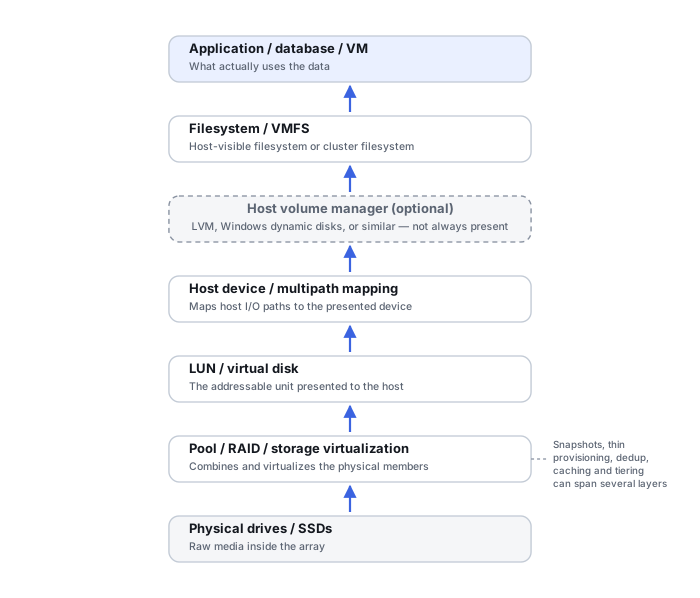
Map the full stack before touching anything
A SAN can stack RAID or erasure-coded groups, a storage pool, thin or deduplicated allocation, snapshots and clones, a LUN, target-to-host mapping, a host file system such as VMFS, NTFS, ReFS or XFS, and finally virtual machines or application data on top of that. Not every array uses every one of these: some have no classic RAID groups, many do not deduplicate, and failover behaviour differs between products. See Understanding Storage Layers Before Recovery for the general layered model this follows. Every layer here carries its own metadata and, often, its own snapshots — recovering one layer is not the same as recovering the one above it.
This page is about locating the failed layer and preserving the right evidence for it. How thin allocation maps, deduplication references, UNMAP reclamation and snapshot lineage affect what can be recovered inside a LUN is covered in LUN, Thin Provisioning and Snapshot Recovery.
Build a correspondence map across layers
A practical map ties each physical component to everything that depends on it, so that a symptom at one level can be traced to the objects above and below it. A useful chain of links is: enclosure, slot and drive serial → RAID group or pool → storage object or LUN identifier → host disk and multipath device → volume or datastore → VM or application. This is a checklist of links to record, not a universal order: some arrays place several LUNs on one pool, some spread one pool over several enclosures, and some have no separate RAID layer at all.
Scroll horizontally to see the full table →
| Link | What to record | Caveat |
|---|---|---|
| Enclosure, slot and drive | Enclosure model, serial and ID; slot or bay number; drive serial number and model | Slot numbering can change after reseating, replacement or recabling; the drive serial is the more stable anchor |
| RAID group or pool | Group or pool name and ID, each member’s role or position, metadata generation or sequence values where the array exposes them | Distributed or erasure-coded pools may have no fixed group per disk; the map then records pool membership instead |
| Storage object or LUN | Volume or LUN name, internal object ID, capacity and block size, the device identifier the array reports (for example an NAA or EUI value), the LUN number in each host mapping | A LUN number is assigned per mapping, so the same number can refer to different LUNs on different hosts |
| Host disk and multipath | The identifier the host uses for the device (for example a WWID or NAA value), the multipath device name, the paths and their states | Path and runtime names can differ from host to host; match on the device identifier instead |
| Volume or datastore | VMFS UUID, disk signature or partition GUIDs, volume-manager identifiers, file-system type | The same identifiers can also appear on a copy or snapshot of the volume, so an identifier match alone does not show which copy is presented |
| VM or application | VM configuration, the virtual disks it uses and their chains, database or application file locations | A VM may use disks on several datastores and LUNs, so one LUN may not hold the whole VM |
Device identifiers are the anchor that ties the array side to the host side. VMware describes NAA and EUI identifiers as generated by the storage device and unique to the LUN, remaining the same when the LUN is presented the same way to every host, while the runtime name may differ depending on the host (Broadcom KB 316540). On Linux, DM Multipath groups several paths to one device under a single World Wide Identifier (Red Hat DM Multipath, Multipath Devices). Other hosts and arrays name these values differently. The LUN-level identities worth preserving are listed in more detail in LUN, Thin Provisioning and Snapshot Recovery.
Presentation failure is not storage failure
A host can lose a LUN because of iSCSI target configuration, network connectivity, Fibre Channel zoning, LUN masking, initiator authorization, a multipath or path failure, controller ownership or failover, or a lost target-to-LUN mapping — while the backing LUN and its data remain completely intact. Treat “the host can’t see the disk” as a presentation question first, not as proof the storage pool was destroyed.
Localize the symptom to a layer
The table gives diagnostic directions: which layer to look at first, which evidence to keep before anything changes, and what the symptom does not establish. None of the rows is a diagnosis, and a symptom at one level can have a cause several levels lower.
Scroll horizontally to see the full table →
| Symptom | Layer to check first | Evidence to preserve | What the symptom alone does not prove |
|---|---|---|---|
| The host does not see the LUN | Presentation: target and initiator configuration, zoning, masking and host mapping, path and multipath state, controller ownership; then array and pool health | Array support bundle and event logs, host storage and multipath logs, zoning and masking configuration, the LUN identifier the host last saw | That the pool, the RAID layer or the LUN’s data is damaged |
| The LUN is visible with the right capacity, but the file system does not read | Whether it is the same LUN (identifier match, not just size), then the host volume manager or partition table, any encryption layer, and the file-system or VMFS metadata; below that, the pool mapping | The identifier comparison, a read-only image or logical export of the LUN, host logs from the first failed mount | That the block contents are correct or current: a wrong snapshot or clone, a damaged pool mapping or ciphertext can all present the expected capacity |
| The datastore reads, but a VM does not start | VM configuration, virtual-disk descriptors and the snapshot or delta chain, file locks, then the guest | Datastore file listing with sizes and times, VM configuration and descriptor files, all chain files as found, host logs | That the datastore and LUN are intact everywhere, or that the guest data is lost |
| The VM runs, but a database does not open | The application layer: database and log files, and which point in time the files represent | Copies of the database and log files as found, application logs, which snapshot or restore point the VM came from | That the lower layers are clean, since a crash-consistent state or block damage below can surface here; or that the database cannot be recovered |
VMFS and VMDK add their own layers
A typical chain continues: SAN pool, LUN, VMFS datastore, VMDK, guest file system, then the actual database or files inside the guest. Recovering a LUN is not the same as recovering the VM or the application running on it. VM-level snapshots have their own delta and parent-disk chains, entirely separate from any snapshot the array itself took of the LUN. VMware’s guidance is explicit that its snapshots should not be used as backups: a snapshot file is only a change log of the original virtual disk, and snapshot files alone are not sufficient to restore a VM if the base disks are deleted (Broadcom KB 318825). Rebuilding a broken delta chain is covered in Virtual Disk Snapshot and Differencing-Chain Recovery.
Dual-controller failover changes what “current” means
Dual-controller SAN systems add controller ownership, mirrored or otherwise protected cache, failover events, ALUA/path states, multipath behavior and firmware interaction on top of the storage stack itself. Capture which controller owned the LUN before the failure and which owned it after, the failover timestamp, cache state, any battery or capacitor warnings, host multipath logs, and controller event logs — a controller failover alone can cause presentation loss with no physical RAID failure at all. How cache is protected and how ownership moves differ between products and firmware versions, so confirm the behaviour from that array’s own documentation rather than assuming it.
Encryption is a separate recovery problem from reconstruction
Encryption can be applied at the NAS shared-folder or volume layer, at a self-encrypting-drive pool, at the SAN array or controller layer, or at the host layer through BitLocker, LUKS or VeraCrypt. Reconstruction does not itself decrypt data. Whether an acquisition contains plaintext or ciphertext depends on where it is taken relative to the encryption layer and whether that layer is functioning with the required keys. A logical LUN export through an unlocked array may already be decrypted at the array layer, while host- or application-level encryption can still remain inside it. Raw member images may retain encrypted content. Identify where the encryption actually occurs, where the keys are kept, the passphrase or recovery key, any key manager or HSM involved, the controller’s security configuration, and any self-encrypting-drive credentials, before assuming any particular acquisition will contain readable data. Encryption Key Hierarchies and Recovery Metadata explains which key records each layer depends on.
Expansion enclosures can look like simultaneous disk failure
A storage pool can span the main chassis, a vendor expansion unit, a JBOD shelf, a SAS expander, or an external RAID enclosure. A single disconnected enclosure can make many member disks disappear at once while every physical disk remains completely healthy. Capture the enclosure model and serial, its enclosure ID, the slot map, cabling, which RAID groups span which enclosures, and the timing of the last known enclosure connectivity event.
Logical LUN export or raw member images
Two kinds of copy answer different questions, and choosing between them depends on which layer is in doubt.
A logical export of an accessible LUN, read through the array and the host, holds the block stream the array presents for that LUN at that moment: pool mapping, thin allocation and the RAID layer have already been resolved by the array. It is often the most useful copy when the lower layers still work and the problem sits at or above the LUN. It does not contain the pool metadata, other LUNs, snapshots that were not presented, unallocated pool space or anything still held in controller cache.
Raw images of the physical members are needed when the RAID layer, the pool or its metadata are lost or doubtful, because only the members still carry what the array would have needed to build the LUN. They contain member-level data and on-disk metadata, but turning them back into a LUN requires the layout and the vendor’s mapping, which may be proprietary and only partly documented. They do not capture configuration kept on the controllers or a management server, cache contents or external key material.
Neither copy, on its own, preserves the whole configuration of the system. Support bundles, configuration exports, event logs and key information have to be collected as separate evidence. What a member image does and does not hold is covered in What a Disk Image Preserves — and What It Does Not, and keeping images apart from working copies in Recovery Copies.
If hosts are still writing, or the array is running background work such as rebalancing, reclamation, scrubbing or scheduled snapshots, the LUN and the array metadata can change while they are being collected. An export that takes hours is not automatically a single point in time, and metadata read at the start may not match the data read at the end. Record start and end times for every collection, note what was still active, and treat creating an array snapshot to export from as a change to the pool metadata in its own right.
When to stop before any repair action
Some situations mean the evidence is not yet good enough for any step that writes to the array. Stop and preserve, rather than repair, when any of these applies:
- Member order or role is unknown. If it is not clear which disk held which position in a group or pool, any assembly is a guess, and a write-capable one can make the guess permanent.
- Metadata generations conflict. Members or controllers that disagree about the latest configuration may reflect different moments in time; Storage Metadata Generations and Consistency covers how to compare them.
- Unwritten cache is suspected. On arrays with write-back cache, a power loss, a battery or capacitor warning, or a controller failure can leave recent writes held only in cache. Actions that discard cache, replace a controller or reset its state can lose that content.
- The pool is degraded and members are unstable. A rebuild or heavy scan reads every surviving member; a member that is already producing errors or dropping out may fail completely under that load.
In these cases, force-importing a pool, initializing a group or LUN, starting a rebuild, or clearing a foreign or stale configuration is not a first step. Each can rewrite the metadata that a different, correct candidate would have needed. RAID Metadata, Member State and Foreign Configurations explains what such actions change at the RAID layer.
Vendor support bundles and diagnostics are excellent for collecting evidence. Any write-capable repair action the same tooling offers is a separate decision that should wait until the full stack, from disks to application, has been mapped.
Training scenario: a pool goes offline after an expansion shelf drops
After a power event, a pool goes offline. Every missing member sits in one expansion enclosure, the hosts have lost their datastores, and the management interface offers to import the pool or clear its configuration.
Many members disappearing together from one enclosure points first to enclosure connectivity rather than simultaneous disk failure. It does not prove that the members are healthy, or that the pool metadata on all members is from the same moment.
Do not accept the import or clear prompts yet. Preserve the support bundle, event logs, slot map and cabling record; establish why the enclosure dropped and when; and compare what each member records about the pool. Image the members if any of them shows errors or the metadata disagrees.
If the pool kept accepting writes while part of it was missing, the members can hold different generations, and reconnecting the enclosure alone may not bring back a consistent pool.
Validate at the level you actually need
Each layer has its own test, and passing one does not pass the layer above it:
- LUN geometry. The device identifier, capacity and logical block size match the records of the original LUN. A correct capacity shows only that the array presents a device of the expected size; it does not show that the blocks inside are correct or current.
- File-system or datastore structures. The partition table, volume-manager metadata and file-system or VMFS structures are consistent and point to the expected files.
- VM disk chain. Every virtual disk the VM uses is present, and each delta or snapshot file links to the right parent.
- Application consistency. Databases and applications open and pass their own integrity checks, and the point in time they represent is known.
Report each result with its scope: which layer it covers, which objects were tested, and what remains unchecked. File-level checks are described in How to Validate Recovered Data.
Technical references: Broadcom KB 316540, Identifying disks when working with VMware ESXi — NAA and EUI identifiers generated by the storage device and unique to the LUN, VMFS UUID, and host-dependent runtime names · Red Hat Enterprise Linux 7 DM Multipath, Multipath Devices — a globally unique, unchanging WWID for each multipath device, and several paths combined into one device · Broadcom KB 318825, Best practices for using VMware snapshots — snapshots are not backups, the delta disk as a change log, and dependence on the base disks. These sources describe VMware ESXi and Linux DM Multipath only; array-side identifiers, cache protection, failover and read-only diagnostics are product-specific and have to be checked in the documentation for that array and firmware.
Related: LUN, Thin Provisioning and Snapshot Recovery · Understanding Storage Layers Before Recovery · Reconstructing NAS Storage Stacks · Storage Metadata Generations and Consistency · Sparse, Thin-Provisioned and Virtual Storage Recovery · Virtual Disk Snapshot and Differencing-Chain Recovery · SAN (Storage Area Network) Failure