Imaging Bad Sectors and Unstable HDDs
The goal of imaging a failing drive is not to make every sector read on the first attempt. It is to acquire the most valuable data the source can still give before it degrades further — which means limiting and ordering the read workload deliberately, and keeping an honest record of what the resulting image does and does not contain.
- A bad sector is a failed host read, not a diagnosis; more retries add load and may not add data.
- A software imager cannot control drive firmware; head-selective reads and resets depend on specific hardware.
- Read order follows source health, value and metadata needs; a full first sweep is not always needed.
- Keep the image, map and source record together; unread areas can hold zeros, holes or old bytes.
- A finished map or image hash does not prove a file intact.
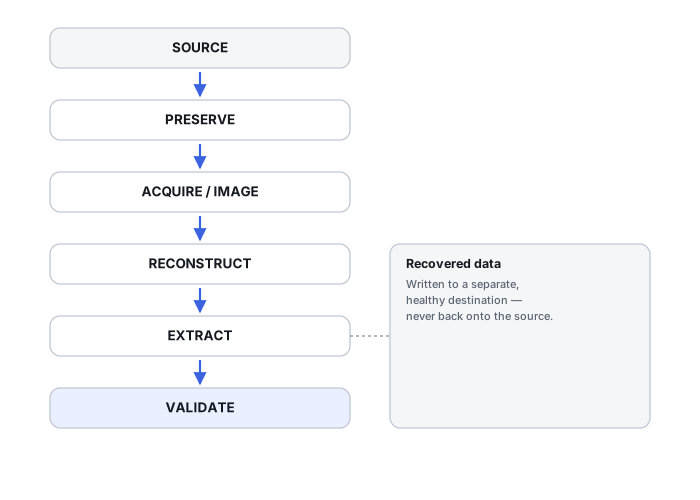
A bad sector is a host read outcome, not a diagnosis
A “bad sector” in an imaging log records an outcome: the host asked for a range and did not get the data back without an error. It does not identify the cause. Localized media degradation, a weak head, a marginal signal that the drive’s own error correction could not resolve, or firmware and service-area behaviour can all end in the same host-visible failure, and a faulty interface path — cable, bridge or power — can look similar. Treating every error as an identical, permanently destroyed spot skips the diagnostic question; treating every error as something another attempt will fix skips it too.
A marginal area can return data on one attempt and fail on the next, because the drive’s internal retries and error correction are working near their limits there. That is an observation about behaviour, not a measured probability, and it is not a promise: repeated reads of a hard region cost time and load a source that may be degrading, with no guarantee that more attempts produce more data. In GNU ddrescue, for example, retry passes are an optional final phase, and every bad sector is tried only once in each retry pass (GNU ddrescue manual, “Algorithm”). How an error, a timeout and a slow but successful read differ is covered in Read Errors, Timeouts and Retries Explained.
What a software imager controls, and what it does not
A software imager such as GNU ddrescue runs on the host and sends ordinary read requests through the operating system, the interface and often a USB bridge. It decides which ranges to request, in what order, in what request sizes, and when to skip on. It does not control the drive’s internal retry and error-correction behaviour, and it cannot shorten every timeout below it: the manual notes that a bad drive can block ddrescue for a long time “until the kernel gives up”. Its --timeout option is the maximum time since the last successful read (ddrescue manpage), not a limit on any single drive command.
Direct disc access is narrower than it sounds. In GNU ddrescue it reads the input bypassing the kernel cache; it needs the sector size to be set correctly, and it may be slower or faster than cached reading depending on the operating system and hardware (manual, “Direct disc access”). It removes one cache layer from the read path. It does not give the imager hardware reset, power control or head selection.
Those capabilities, where they exist, belong to particular hardware imaging systems working with particular drive families: command-level timeouts at the interface, resets or power cycles under the imager’s control, or reading by head where a system supports that for a given drive. They are not general features of ddrescue or of software imagers, and what a given system can do has to be checked in that system’s own documentation; this page does not document any specific product. Hardware Imagers & Recovery Rigs and Professional HDD Recovery Hardware describe the categories, and head-related failures are covered in HDD Heads, Platters and Mechanical Failure.
Limiting the read workload: order and priority
Multipass imaging does not mean reading the drive in an arbitrary order. In GNU ddrescue the first copying pass reads the non-tried parts of the input forward, and the first two passes skip beyond slow areas; the direction is reversed after each pass, and the last copying pass sweeps with skipping disabled, before the trimming, scraping and optional retry phases deal with the blocks that failed (manual, “Algorithm”). A sequential fast pass that steps over difficult places is still multipass imaging. The point is to secure the easily readable data while the source still cooperates, and to leave the hard regions — and the decision whether to return to them at all — until later.
What is read first is a decision for the case, not a fixed rule. It depends on:
- Source health. A drive that is getting worse justifies a narrower plan than one with a stable, localized slow zone.
- A known file map. Where filesystem metadata is already available, the extents of the files that matter can be acquired before the rest.
- Metadata needs. The structures that describe the filesystem can be worth securing early, because without them the image may be usable only through carving.
- Value. What the owner actually needs back, which can be a small part of the drive.
Not every case needs a full first sweep of the whole address space. On a source that may not last, acquiring metadata and high-value extents first and deferring the rest can be the better use of its remaining operating time — at the cost of a map with large untried areas, which then has to be reported as such. Preflight checks, the pass plan and stop conditions for the acquisition as a whole are in How to Image a Failing Drive Safely; this page does not repeat that workflow.
What a GNU ddrescue mapfile records
The map is recovery metadata, not a side effect of imaging: it is the only record of which parts of the image hold data read from the source and which do not. The GNU ddrescue mapfile distinguishes five block statuses. Four of them describe work that has not succeeded yet, at different stages, and none of them is simply “skipped” or “lost”.
Scroll horizontally to see the full table →
| Status | Mapfile character | What it records | What it does not mean |
|---|---|---|---|
| Non-tried | ? | Not read yet | That the area is bad, or that it is good |
| Non-trimmed | * | Part of a failed large-block read whose edges have not yet been retried sector by sector | That every sector in it is unreadable |
| Non-scraped | / | Failed area not yet read sector by sector | That scraping it would fail |
| Bad-sector | - | Sectors that failed when read individually | That the media is physically destroyed there, or that another attempt, access path or tool would also fail |
| Finished | + | Read without a reported error | That the bytes match what the file held before the failure, or that the file is intact |
“Finished” means the drive returned data for that range without an error being reported. It is not a check of the content: the ddrescue manual itself mentions drives that “return garbage data after finding errors”, and the map says nothing about higher layers such as a filesystem, an application or a RAID generation. Untried and non-trimmed areas in a closed acquisition are an honest record of a decision to stop, not evidence that the data there is gone.
Keep the image, map and source record together
An image without its map can still be analysed, but its read coverage cannot be established reliably, and acquisition placeholders cannot be told apart from bytes actually read by looking at the content alone. A map without a record of the source cannot be trusted for a resume. The map need not be the only record — other acquisition logs may exist and belong with it. Keep these together as one acquisition record:
- the image and the map as a matching pair — the map version that belongs to that state of the image;
- source identity: model and serial number, not a device name, and the capacity the source reported;
- sector presentation: the logical and physical sector sizes reported through the access path actually used;
- the range acquired and any offsets, in stated units — bytes, or sectors of a stated size;
- acquisition notes: tool and version, access path, options, passes run, interruptions, resets and observed symptoms.
Resume only when the same source is confirmed and the map is compatible with the output it describes. A device name such as /dev/sdX is not a stable identity: the ddrescue manual warns that some systems change device names on reboot and advises checking that the names match the model and serial number, and the manpage warns against specifying an old mapfile from an unrelated rescue by mistake. Keeping the output and map coherent across interruptions is covered in How to Image a Failing Drive Safely.
What unread areas contain in the output
Bytes at an unread position in the output are not data from the source. What they are depends on the workflow. GNU ddrescue does not write zeros to the output when it finds bad sectors: in a regular file that ddrescue created, bad-sector areas contain zeros, while on a device or a previously existing file they still contain whatever was there before (manual). Other tools may leave sparse holes, write a placeholder pattern or pad in their own way, and the behaviour has to be checked for the tool and version used. Zeros in the output therefore do not by themselves show that the source returned zeros; only the map says which areas were read.
Fill mode overwrites output areas of chosen statuses with a pattern, which has legitimate uses such as marking bad areas so that affected files can be found (manual, “Fill mode”); in fill mode ddrescue rescues nothing, it only writes to the output. Applied to the only copy of an acquisition without a separate plan, a fill changes the evidence: whatever those areas held is replaced, and a later reader may take the pattern for something the source contained. Fill a working copy, keep the original image and map, and record what was filled and why. The wider difference between missing reads, zeros and sparse storage is covered in What a Disk Image Preserves — and What It Does Not.
Logical and physical sector sizes
A drive reports a logical sector size, the unit the host addresses, and it can report a different physical sector size; Linux, for example, exposes them as separate attributes, logical_block_size and physical_block_size (Linux kernel queue sysfs documentation). They are not the same fact, and neither describes interface behaviour: an adapter or bridge can present a drive differently from a direct connection. Record what the source reported through the path that was actually used, and keep offsets in stated units, so that the map, the image and any later filesystem analysis agree on what one sector means.
There is no universal block size for imaging. For GNU ddrescue the sector size has to be set correctly for direct disc access to work, and an incorrect value can cause unaligned read errors (manual, “Direct disc access”); beyond that, suitable request sizes depend on the tool, the access path and how the source is behaving.
Resets, power cycles and when to stop
An unstable drive may stop responding, drop off the bus or need a reset. On a software path the operator has little control over how that happens; the ddrescue manual only notes that the drive may need to be power cycled before ddrescue is restarted. That describes a situation, not a repeatable procedure for use at home: each power cycle of a failing drive is itself a load, and there is no universal number of cycles, retries or timeout value that makes repetition safe.
Treat the following as reasons to stop and reassess, not as reasons to add retries:
- new or changed noise, such as repeated tapping, clicking or grinding;
- the drive losing detection, or reporting a different identity or capacity;
- repeated read resets or disconnects;
- a sharp drop in read rate, or failing ranges spreading across the drive rather than staying in a localized zone.
Continuing at that point mostly spends what the source has left. Stopping keeps the image and map already acquired; the next decision — mechanical assessment, a different access path, or accepting a partial result — belongs to whoever is responsible for the case, not to an unlimited retry setting. Do not run repair, defragmentation or write-based sector-remapping utilities on the source either: they are built to return a drive to service, not to preserve it as a recovery source.
Reading an incomplete image: known and unknown file impact
An image with gaps is still useful as long as what the gaps mean is kept clear. Where filesystem metadata is readable, each file’s extents can be compared with the map, which gives three different situations:
- Extents known and all in finished areas: the map shows no missing reads for this file. That is not yet a check of its content.
- Extents known and overlapping bad-sector, non-scraped, non-trimmed or non-tried areas: this copy has a known acquisition gap for the file; the missing source bytes were not confirmed by a read. Whether the file is still usable is a separate assessment, and none of these statuses on its own means the original data is physically lost or can never be read.
- Extents unknown — the file’s metadata was not read or its mapping is uncertain: its relationship to the map is unknown, not clean and not zero impact.
These correspond to the acquisition-overlap states described in How to Validate Recovered Data. The ddrescue manual describes one way to find affected files — filling the bad areas of a copy with a marker string and searching the files for it — and notes that if all damaged areas are in unused space, no file will contain the string.
Illustrative example: an incomplete image and its file impact
After a first pass and limited trimming, the map shows most of the drive finished, a cluster of bad-sector blocks in one region, and a large untried area left when the drive began disconnecting. The filesystem metadata was read.
Files with all extents in finished areas show no missing reads in the map. Two needed documents have extents in the bad-sector cluster, and several others have extents in the untried area: all of them have a known acquisition gap in this copy, and whether they are still usable has to be assessed separately. One folder’s directory record sits in the untried area, so the mapping of its files could not be recovered: their relationship to the map is unknown, not clean.
Keep the original image and map; work on a copy; list files against the map and report the three groups separately. Decide on any return to the untried area by the drive’s condition and the value of what lies there, not to make the map look complete.
The listing is only as good as the metadata it uses, and finished extents say nothing about whether the content was already wrong before the failure. Recovered files still need their own validation.
Validating on the copy
Validation happens on the image or a copy of it, not by rereading the source. Comparing map coverage with file extents, where metadata allows it, is the most direct link between the acquisition and individual files. A hash of the whole image fixes the artifact that was obtained, so that later copies can be checked against it; it does not show that every sector was read, and it does not show that what was read is correct. Image completion and file integrity are separate questions: the map answers the first, and file-level checks, covered in How to Validate Recovered Data, answer the second.
Technical references: GNU ddrescue manual — passes, mapfile statuses, direct access, fill mode · ddrescue manpage, as packaged by Debian — --timeout, mapfile warning · Linux kernel: queue sysfs files — logical vs. physical block size · Seagate: Internal Hard Drive Troubleshooter — abnormal drive noises. The manual checked is for ddrescue 1.28 and the manpage for 1.29; options can change. Seagate’s page is a service troubleshooting guide, not an imaging protocol.
Related: How to Image a Failing Drive Safely · Read Errors, Timeouts and Retries Explained · What a Disk Image Preserves — and What It Does Not · How to Validate Recovered Data · HDD Heads, Platters and Mechanical Failure · Hardware Imagers & Recovery Rigs · Professional HDD Recovery Hardware · SMART & Drive Diagnostic Tools · Bad Sectors and a Failing (but Working) Drive