Bad Sectors and a Failing (but Working) Drive
A drive that's slow, occasionally throws read errors on specific files, but otherwise still works, is usually failing gradually rather than having already failed — and that's exactly the window where the right response can keep this from ever becoming a real emergency.
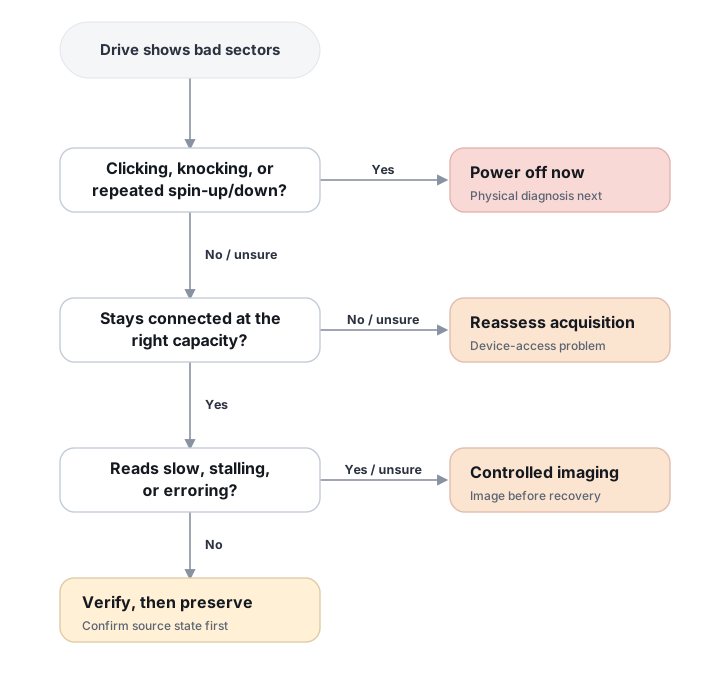
The same logic, at a glance
A static overview of the three questions below and where each answer leads — for scanning before you click through.
What should you do next?
Answer up to three questions about the drive's current behavior. This changes the recommended first step — not the diagnosis.
Bad sectors describe a read problem, but the safest next step depends on whether the drive is mechanically unstable, repeatedly disconnecting, or simply returning localized read errors.
Is the HDD clicking, knocking, repeatedly spinning up/down, or making new unusual mechanical sounds?
Does the device remain connected and report approximately the correct capacity?
Are reads unusually slow, stalling for long periods, or producing repeated read errors?
Do not continue with software scans or ordinary imaging.
Mechanical symptoms can indicate a problem below the file-system layer. Further operation may reduce the amount of data that can still be acquired.
Recommended path: stop using the drive → physical diagnosis / professional recovery.
Avoid: CHKDSK/fsck, full scans, repeated power cycles and attempts to “see if it gets better.”
Treat this as a device-access problem first.
Repeated disconnects, incorrect capacity or uncertain device identity can indicate controller, interface, firmware or underlying hardware problems. A normal file-recovery scan is not the first diagnostic step.
Recommended path: preserve current state → verify device/interface behavior → controlled acquisition or professional diagnosis.
Logical vs. physical recovery → · When to stop software recovery →
Preserve readable sectors before file-system recovery.
The device is accessible, but slow reads, timeouts or read errors make repeated full scans undesirable. Acquire the source with a mapped, staged imaging process and perform recovery from the image.
Recovery path: source → controlled image → file-system/file recovery → validation.
Avoid: repair utilities, repeated full scans and aggressive retries before easier regions are preserved.
The current symptoms do not strongly indicate an unstable source.
If the data is important, preserve the device before repair or experimentation. A healthy-looking SMART report does not override actual read behavior, and the cause of the original bad-sector indication should still be verified.
Recovery path: verify source state → image if appropriate → recover files from the preserved copy.
This guide classifies the next recovery action from observable symptoms. It does not diagnose hardware condition or estimate a percentage chance of recovery.
What's actually happening
On hard drives, unreadable sectors can result from media defects, head problems, contamination, or other developing faults. The drive may remap unstable sectors to spare locations, and SMART attributes can provide useful evidence, although their meaning is vendor-specific. SSDs expose similar logical read errors, but internally they manage flash pages and erase blocks through a controller, ECC and wear management rather than behaving like a platter with literal magnetic sectors.
What you can observe safely
Before treating a bad-sector report as a diagnosis, record what the device actually does. Useful observations include whether it identifies with the expected model and capacity, whether it remains connected under light reads, whether the same regions repeatedly stall or fail, and whether the number or distribution of errors appears to be changing. SMART can add context, but the device's real read behavior is often more important than a single health label.
Do not turn this check into a full surface test. A long diagnostic scan reads large portions of the source and can spend valuable operating time on difficult areas before any data has been preserved. If access is already slow, unstable or error-prone, controlled acquisition is the safer way to learn more while also saving readable data.
What changes the recovery outlook
- Where the unreadable areas are. Damage in unallocated space may have little effect, while a small unreadable region inside file-system metadata, a database or a large archive can affect much more than its raw size suggests.
- Whether the errors are stable. A few repeatable unreadable sectors are a different problem from a device whose timeouts, resets or unreadable regions are expanding during acquisition.
- Which heads or flash regions are involved. On an HDD, one weak head can make errors appear in a repeating pattern across the address space. On an SSD, controller/ECC behavior can produce a very different failure pattern even though the host still reports logical read errors.
- How much stress has already been applied. Repeated scans, long retries and continued normal use can consume time on an unstable source without increasing the amount safely preserved.
- Whether a usable image already exists. Once readable sectors are preserved, file-system analysis and retries against difficult regions can be separated from the risk of losing the source entirely.
How recoverable this really is
This one comes down mostly to timing and distribution of the unreadable areas. Files whose required sectors remain readable may be recovered intact; files that intersect unreadable areas may be partial or corrupt. If required sectors were not acquired, the current recovered file cannot be considered complete — that does not by itself prove those sectors are physically unrecoverable by every available acquisition method, though a specialist should not be assumed to always retrieve them either. A growing count of read errors or reallocated/pending sectors is a strong reason to stop treating the device as reliable, but SMART data cannot predict an exact failure date or guarantee that complete failure is imminent.
The general approach
The priority is to preserve the readable address space with imaging tools built specifically to handle read errors gracefully. A controlled acquisition normally favors broad first-pass coverage, records unreadable regions, skips past trouble instead of stalling indefinitely, and returns to difficult areas later with a more selective retry strategy. The first objective is therefore not a perfect image at any cost, but the best preserved representation of the source before its condition changes. Once a sufficiently useful image exists, file-system and file recovery should happen from that copy rather than through repeated scans of the original device.
Bad sector is the host-visible symptom, not the diagnosis
“Bad sector” actually covers at least three different signals, and they should not be collapsed into one. A host-visible unreadable LBA — the host asks for an address and doesn’t get valid data back — can trace to localized media degradation, a weak read/write head, the limits of the drive’s own error-correcting code, internal firmware/service-area complications, SSD NAND/ECC/controller limits, or general device instability.
A SATA/USB transport problem — CRC errors, resets, command failures, disconnects — can produce symptoms that look identical from the host’s point of view, but this is not automatically a media defect; the cable, connector, bridge or port can be the actual fault.
An operating system can also mark a filesystem-level “bad cluster” based on what it observed at the time it tried to write or read there. That OS-level flag is not the same thing as a physical diagnosis of the underlying device — the two can align, but neither implies the other.
These aren’t interchangeable explanations, and a growing bad-sector count is a reason to investigate which of them is actually happening, not a single fixed diagnosis.
Remapping is maintenance, not preservation
A sector’s lifecycle on a drive can look like this: it becomes difficult to read; firmware may keep it pending; a successful later read may allow it to be remapped; and a write to that address can cause it to be reassigned to a spare location. Once remapped, the old physical location is no longer normally addressed through the host LBA interface at all. A remap is a drive-maintenance action, not a data-preservation technique — do not run a “fix bad sectors” function or force a remap before the data you actually want has been acquired.
Vendor diagnostics split into two different categories here. Read-only or self-test style diagnostics can still consume significant operating time on a degrading drive, but they don’t intentionally write to it. Repair or “fix” functions can write and remap, and belong after preservation, not before — a vendor may call a long diagnostic “data safe” because it doesn’t intentionally overwrite user files, but that’s not the same thing as low-risk for a source that is mechanically or electrically degrading.
Don’t spend the drive’s remaining life on the hardest sectors first
An unstable drive may have a limited and unpredictable window of useful access, so retries should be budgeted in favor of broad data preservation first, rather than spent against its hardest, most stubborn sectors early on. Professional imaging follows a multipass strategy instead: a fast first pass secures everything that’s readily readable, and only afterward does a second, more selective pass return to the difficult regions — see imaging bad sectors and unstable HDDs for how that staged approach works.
One weak head can create large bands of read errors
On a multi-surface HDD, a single weak or failing head can produce a repeating pattern of read errors across a large part of the address space, even while the drive’s other heads read the rest of the surface normally. That pattern is a strong acquisition clue rather than a conclusive diagnosis — occasionally something else can produce similar banding — but it is usually enough to justify head-aware imaging, which can prioritize the healthy heads’ sectors first and defer the weak head’s regions, rather than treating the whole drive as uniformly unreliable — see HDD heads, platters and mechanical failure.
The imaging map matters as much as the image itself
A controlled acquisition doesn’t just produce a copy of the drive — it produces a map of exactly which sectors were read successfully, which were skipped, and which failed outright. That map is what lets file-system and file recovery report, file by file, whether the sectors a specific file actually needed came through intact, rather than leaving that question unanswered until the file is opened. The map by itself does not prove semantic file integrity, though — validating a specific file still has to consider whether all of its required extents were acquired, how its format or decoder behaves with any gaps, checksums where the format provides them, and application-level consistency, not just what the sector map alone reports.
Don't keep the drive in daily use "since it still mostly works," and don't run disk-checking or defragmentation utilities on it. Repeated scans, retries and writes like these can consume operating time and may worsen some failure modes, without preserving any additional data.
Whether software alone is enough here, or whether dedicated imaging hardware is worth the cost, is exactly the question software vs. hardware recovery tools walks through. See HDD vs. SSD vs. NVMe for how bad-sector-style degradation differs across drive types. For the professional-grade acquisition hardware this depth of imaging actually requires, see professional HDD recovery hardware.
This page describes the general situation, not a guaranteed fix for your specific case. If you'd rather have someone experienced take a look before you try anything, see what a hands-on evaluation looks like.