Partition Loss
When a previously present partition disappears or the disk shows expected address space as unallocated, the partition map may be missing or inconsistent while the filesystem and file content remain elsewhere on the device. Similar symptoms can also result from wrong device capacity, sector translation, overwritten disk-start metadata or missing storage layers, so the partition map should be verified rather than assumed.
Partition disappeared: what should you do next?
Answer one question about the current state. The result suggests the safer next step rather than diagnosing the failure.
Is the underlying device stable and readable at the expected capacity?
Reconstruct before writing.
Infer partition boundaries and verify the file system virtually. Copy data first; writing a partition table is a repair action, not a prerequisite for recovery.
Solve source access before partition recovery.
Incorrect capacity, disconnects or read instability can indicate a lower-layer problem. Preserve readable data before reconstructing partitions.
This guide classifies the next recovery action from observable information. It does not diagnose hardware condition or estimate a percentage chance of recovery.
What's actually happening
A partition map tells the operating system where volumes begin and end and what type of partition is expected. In an MBR layout the primary table is near the start of the disk; GPT uses a primary header and entry array near the start plus backup GPT metadata near the end. If the active map is deleted, overwritten or internally inconsistent, a volume can disappear from normal disk management even when its internal file-system structures remain largely intact.
How recoverable this really is
Recoverability can be very good when only the partition map is lost, but “unallocated” does not prove that this is the only problem. The same view can follow a damaged GPT/MBR, a wrong sector size or translation, an overwritten beginning of the disk, a missing RAID or storage layer, or a device reporting the wrong capacity. The important distinction is whether the expected file system can still be located and read coherently.
What changes recoverability
How much of the partition metadata is missing. GPT provides primary and backup metadata, while MBR layouts may depend more heavily on structures near the beginning of the disk. A damaged primary copy is different from a disk whose start has been overwritten by another operating system or disk-management operation.
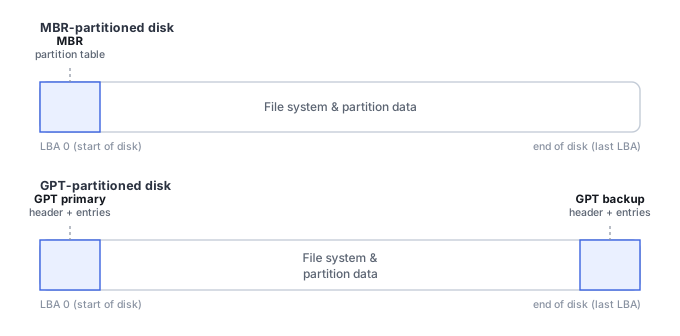
Whether the file system itself is intact. If valid NTFS, exFAT, APFS, ext or other structures can be found at a plausible offset, files may be recoverable without repairing the partition table at all. If those structures are also damaged, the problem overlaps with File System Corruption.
Whether the reported capacity, logical sector size and offsets match what's expected. Wrong capacity, sector-size translation, USB bridge behavior, RAID members presented individually, or a missing volume-manager layer can make correct partition boundaries appear wrong.
What happened after the loss. Initializing the disk, creating a new partition, formatting it or installing an operating system can overwrite the same early regions and file-system metadata needed to reconstruct the previous layout.
What you can check safely
Record the device's reported model and capacity, whether it previously contained one or several partitions, the approximate partition sizes, file-system types, encryption state and any recent partitioning or operating-system changes. If GPT is expected, the presence of valid backup metadata can be informative, but do not write a reconstructed table merely to test a theory.
The general approach
Rather than trusting the missing or wrong partition table, recovery tools can scan the disk directly for file-system structures and infer likely partition boundaries from boot sectors, superblocks, backup metadata, and the file system's own internal layout. A disk that has been repartitioned or reused can still carry stale boot sectors or superseded file-system structures left over from an earlier layout, so a signature match alone is not sufficient — a candidate offset needs coherent file-system metadata, plausible boundaries and readable content before it is treated as the recovered partition. For important data, the safer first goal is usually to verify the found file system and copy files out — preferably from an image or clone — before writing a reconstructed partition table back to the source disk. Restoring the partition table is a repair operation, not a prerequisite for file recovery.
A recreated partition at the wrong offset can imitate corruption
If a filesystem originally started at one LBA and a later, guessed partition recreation starts a few thousand sectors further in, the operating system will see an unknown or RAW volume with an apparently invalid boot sector — while the actual filesystem body remains completely intact at the old, now-unreferenced offset. This is exactly why guessing at partition recreation, rather than discovering the real boundary first through structural validation, tends to make diagnosis harder rather than easier. See Partition Table Recovery and Filesystem Discovery for how to locate the genuine offset before writing anything.
Don't initialize the disk, create a replacement partition, or format the unallocated space merely to make it visible again. Those are write operations that can overwrite partition metadata and file-system structures before the old layout has been verified.
Partition-specific tools like Active@ Partition Recovery or Hetman Partition Recovery are built for exactly this situation. See the full directory of recovery software by vendor · Drive Asks to Be Initialized · Drive Shows the Wrong Capacity · Drive Not Detected · Partition Table Recovery and Filesystem Discovery · NTFS MFT, Allocation and File Reconstruction.
This page describes the general situation, not a guaranteed fix for your specific case. If you'd rather have someone experienced take a look before you try anything, find a recovery provider by region.