Remote NAS Recovery vs. Member-Level Reconstruction
“NAS recovery” can mean scanning storage that a still-running appliance already exposes, or reconstructing the needed storage layers from removed member disks or their images. The useful question is not whether software “supports NAS”, but at which still-working layer the workflow can enter, and which members, metadata, keys and devices that entry point depends on.
- Remote recovery scans what a running NAS already exposes; it does not necessarily reconstruct the RAID or storage pool underneath.
- A running NAS does not mean every encrypted volume is unlocked; a share, a block volume and a raw member are different representations.
- Member-level work can reconstruct supported layers only if the members, metadata and key dependencies are available; an assembled array is not automatically plaintext.
- A missing controller, appliance, bridge or key service may hold keys or sector presentation that software geometry cannot always replace.
- No single rule fits every case: keeping the NAS running, shutting it down, exporting or imaging first each needs a reason based on its state and health.
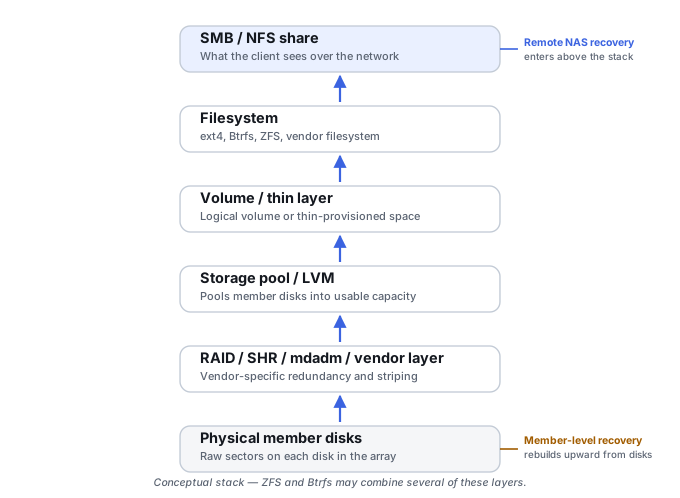
A NAS is a stack, not one object
A running NAS sits on top of several independent, dependent layers: the appliance and its operating system, network/SSH access, a logical volume the NAS exposes, a file system, an LVM or thin-provisioning/storage-pool layer, a RAID or mdadm layer, member partitions and metadata, and finally the physical disks themselves. Encryption can sit at more than one of these points: inside the drive, in a controller or bridge, on a volume, or on a shared folder. See Understanding Storage Layers Before Recovery for the general version of this idea. Different recovery tools enter this stack at different points, and a tool that’s excellent at one entry point can be undocumented at another.
Access path and exposed representation are separate questions
“Remote” or “member-level” describes how a workflow reaches the storage. A separate question is what object the system actually hands over at that point, and whether it is plaintext or ciphertext. The same NAS can present the same data in several representations, and each one depends on different things:
Scroll horizontally to see the full table →
| Representation | What it is | What it depends on | What it does not give you |
|---|---|---|---|
| Unlocked share or mounted file system | Files and folders the running NAS presents, over a network protocol or to an administrative session | A working appliance, an assembled pool, and any folder or volume encryption already unlocked on it | Deleted or unallocated areas, unless the tool reaches a lower representation; encrypted folders that are not mounted |
| Host-visible block volume | A logical volume or LUN the NAS exposes internally or to hosts, which a tool can scan below the file level | The NAS assembling its RAID and pool; whatever unlock happens at or below that volume | Members or metadata below the volume; a guest file system’s plaintext if the volume itself carries its own encryption |
| Raw member disk or member image | The sectors one physical disk returns when read on its own | The disk’s health and security state, and how its interface or bridge presents sectors | The array, pool or file system, until those layers are reconstructed; plaintext, if encryption sits above or inside this layer |
A block volume a NAS exports to other hosts can carry a whole further stack of its own; SAN Storage Stack Reconstruction covers that direction. The reader’s decision has to account for access, representation, keys and source health separately, because a good answer to one does not answer the others.
Class A — remote logical recovery from a running appliance
This class applies when the NAS is functional enough to boot, initialize its own storage stack, expose the relevant volume internally, and accept network or SSH access — the recovery program connects over the network, authenticates, and scans a logical volume the NAS itself has already assembled. The software doesn’t necessarily reconstruct the physical RAID or storage stack at all; it’s working several layers above that. For example, EaseUS describes its NAS feature as a remote connection from one PC, with SSH turned on and the NAS user name and password entered, and says recovery runs without taking the disks out and without needing to reconstruct RAID (EaseUS NAS recovery page). Wondershare Recoverit describes a comparable remote workflow for Synology, QNAP, WD and other supported devices: turn on SSH, enter the IP, port, user name and password, and recover without unplugging the NAS drive (Recoverit NAS recovery page). These are vendor descriptions of their own products; what each one does on a specific model and failure has to be checked in that product’s current documentation.
Network or SSH access determines how the tool reaches the storage; it does not determine what the tool can read. What the scan sees is whatever the running system exposes at that moment: a share, a mounted file system, or a block volume, as plaintext only if the relevant encryption is already unlocked. A running NAS is not the same as access to all of its encrypted volumes. A shared folder or volume that was never mounted after the last restart, or whose key is not available to the appliance, may not be visible as plaintext through any remote path, and an administrative login is not itself a key. What a valid unlock path looks like is covered in Encryption Key Hierarchies and Recovery Metadata.
This class is a good fit for accidentally deleted files, deleted folders, some formatting or logical-volume cases while the NAS still provides sufficient access, and filesystem-level corruption that doesn’t prevent the NAS from exposing a scannable object — useful precisely because it avoids opening the appliance. Its preconditions bundle several requirements at once: the NAS boots, the network and SSH (or a vendor-supported remote-access method) work, administrator credentials are available, the underlying storage pool can still be assembled by the NAS itself, any encryption on the target is unlocked, and the disks are readable enough for the NAS OS to operate normally. If the array can’t assemble — destroyed RAID metadata, too many failed members, unknown member order, damaged LVM or pool metadata, broken Btrfs/ZFS structure, missing controller metadata, or a dead appliance — remote logical recovery may simply have no usable logical volume to scan. That’s not a failure of the filesystem scanner; it means the layer beneath it no longer exists.
Class B — member-level reconstruction from disks or images
Here the recovery application works directly from individual physical member disks, sector images of members, or partial/bad-sector images of members, and reconstructs the needed storage layers outside the original NAS. R-Studio’s NAS recovery article describes taking the disks out of the NAS and connecting them to a computer, automatic assembly of mdadm RAID and LVM2-based volumes “in most cases”, and adding RAID 5 components manually when the program cannot identify some of them (R-Studio: Data Recovery from a Simple NAS). UFS Explorer RAID Recovery’s product page lists automatic reconstruction from RAID metadata, recognition of named NAS vendor layouts, a manual RAID Builder for when metadata is lost, and adaptive reconstruction using bad-sector maps made during imaging (UFS Explorer RAID Recovery). Both are product-specific descriptions of supported layouts, not a promise that any pool or encryption layer will be handled; Reconstructing NAS Storage Stacks covers the layer-by-layer mechanics this class has to solve.
Member-level work reconstructs the layers a tool supports and the case needs, and only when the members, their metadata and the key dependencies are available. An array that a tool assembles automatically does not mean that every pool layout above it is understood, or that an encryption layer has been opened. Where the members return ciphertext, a reconstructed mapping may expose an encrypted logical view until the relevant decryption layer is available. A read-locked member may provide no usable sectors for that mapping in the first place.
Member-level reconstruction is often the candidate approach when the NAS no longer boots, the share is inaccessible because the array or pool has failed, one or more RAID members has failed, RAID metadata is missing or corrupted, the array was reinitialized, the chassis is unavailable, or recovery needs to work from disk images rather than live NAS access. Whether it can succeed outside the original hardware depends on what that hardware contributed. An original controller, appliance, USB or SATA bridge, or an external key management service may hold the keys, or may determine how sectors are presented to the host. If it did, the absence of the original device is not always something software geometry can make up for, however correct the RAID parameters are. RAID Metadata, Member State and Foreign Configurations covers what the original controller’s metadata records before any change.
Class C — hybrid capability
Some products combine both approaches in one tool: a remote scan when the NAS is still operational, plus direct member-level recovery for a failed array, automatic storage-metadata reconstruction, and a manual fallback when automatic detection isn’t enough. For a comparison page, a hybrid product deserves its own classification rather than collapsing into the same single “NAS: Yes” as a remote-only or member-only tool.
A five-state scale instead of one NAS checkbox
Because a product can combine several of these capabilities independently, a single ordinal score hides more than it reveals. A more honest model rates each capability separately:
- N0 — no dedicated NAS workflow: ordinary recovery only; NAS members may still be usable if they expose supported standalone file systems on their own.
- N1 — remote logical NAS recovery: connects to a running, reachable NAS and scans the logical storage it already exposes.
- N2 — automatic member-level reconstruction: recognizes supported NAS RAID/storage metadata directly from member disks or images and assembles the logical storage automatically.
- N3 — manual member-level reconstruction: allows manual definition or correction of RAID geometry or storage relationships when metadata is unavailable or ambiguous.
- N4 — advanced storage-stack reconstruction: handles multi-layer structures such as RAID plus LVM/thin plus file system, vendor-specific layouts, nested arrays, or technologies like Btrfs, ZFS or SHR.
A single product can score, for example, remote: yes, automatic member reconstruction: yes, manual reconstruction: no, advanced stack reconstruction: partial — four separate facts a bare NAS checkmark would erase. Encryption support is a further, separate fact: a capability at any of these levels says nothing about which encryption layers the product can open, or with which keys. A NAS label on a product page also covers only the functions the vendor actually describes.
What an encrypted member can return when read on its own
When a member is read outside its original system, the result depends on where its encryption lives. These are different states, and they need different things to move forward:
- A locked self-encrypting drive may not return user data at all. In the TCG and NVMe description of self-encrypting drives, data is encrypted inside the drive with a media encryption key stored only in wrapped form, and once a credential is set and the device is locked, user data is not accessible until the correct credential is supplied (TCG and NVMe joint white paper). How a particular drive reports a read of a locked range is implementation-specific.
- A member encrypted by a controller, appliance or bridge may read normally, sector by sector, and still return only ciphertext, because the key and the decryption step belonged to the device that is no longer in the path.
- An encrypted software volume on top of the reconstructed array or pool needs its own unlock layer — its headers or key metadata plus a valid credential or recovery key — after the lower layers have been reconstructed.
None of these states can be diagnosed from the symptom alone. A RAW volume, a region of zeros or random-looking bytes can also come from a wrong offset or geometry, an unwritten or trimmed area, a member that belongs to a different array, an unsupported layout, or simply a damaged area. Identify the encryption design from the system’s configuration, records and metadata, not from how the bytes look. Encryption Key Hierarchies and Recovery Metadata explains the key paths themselves; being able to unlock with a valid key is a different thing from bypassing encryption, and this page does not suggest the latter.
Training scenario: the chassis is dead and the members look like noise
A NAS chassis no longer powers on. Its disks connect to a recovery computer and read without errors, but no tool finds RAID metadata or a file system, and the sectors look random.
This fits several explanations: encryption in the appliance, a controller or a bridge; a software-encrypted volume that would only appear after reconstruction; a vendor layout the tool does not recognize; or wrong offsets. Random-looking bytes alone do not show which one applies.
Image the members within their health limits, then establish from configuration records, documentation and metadata whether encryption was enabled, at which layer, and where the keys or recovery keys are kept, before trying more geometry.
If the keys existed only inside the failed device or an unavailable key service, member-level reconstruction can at best assemble ciphertext. Reaching plaintext then depends on recovering that dependency, not on the RAID parameters.
Matching the failure to a class
A deleted file on an otherwise healthy NAS is usually a Class A case. A formatted NAS volume with a healthy array may work through either class depending on exactly what the NAS still exposes and what’s actually been overwritten. One failed RAID member with the NAS still online may still allow remote recovery, but source health starts to matter and imaging or replacement decisions become relevant. An array degraded beyond the NAS’s own tolerance, or a reinitialized array, usually needs member-level reconstruction — and for a reinitialized array specifically, the real question becomes what metadata was actually overwritten and whether reconstruction is possible at all.
A dead chassis with intact disks can be a candidate for member-level reconstruction, and often is, but only if the chassis contributed nothing that cannot be reproduced: if the appliance, a controller, a bridge or a key service held the keys or shaped how sectors are presented, member-level work depends on recovering that dependency too. Damaged storage-pool, LVM, Btrfs or ZFS metadata on top of an otherwise fine RAID layer means a bare RAID reconstruction isn’t the whole job — the upper storage layers still need their own reconstruction.
A physically failing member needs a health assessment, any stabilization it requires, and a controlled acquisition plan before broad logical scanning, whether that scanning runs remotely through the NAS or against the member itself. A full-surface scan, or a NAS scrub or rebuild, can be the very workload that finishes a weak disk. Imaging is not a cure in itself: an imaging pass still loads the distressed source, which is why the order, the read strategy and the stopping points have to be planned. How to Image a Failing Drive Safely covers that plan, and What a Disk Image Preserves — and What It Does Not covers what the resulting image does and does not carry, including encryption state.
A live NAS: export, keep running or shut down
Remote recovery carries one risk that member-level work doesn’t: the NAS stays live. A running appliance can keep writing — ordinary filesystem writes, journaling, snapshots, logs, indexing, RAID maintenance, background scrubbing, or application activity — and for a deleted-file case specifically, continued operation can overwrite exactly the data being recovered.
That does not make one default right for every case. When a NAS is still serving data, a prioritized export of the most important unlocked data can be one of the options, if the members’ health and the consistency of what is being copied allow it; for databases, virtual machines or other files still being written, Live Systems, Snapshots and Consistent Recovery Copies explains what a copy taken while they run does and does not capture. Keeping the NAS running preserves unlocked state and access that a restart may lose, and also keeps writes and background tasks going. Shutting it down stops those writes, and may lock encrypted volumes or change how weak disks behave on the next start. Imaging every member first preserves the lowest layer, and also puts load on each source. “Always keep it running”, “always shut it down” and “always image every member first” are all wrong as rules; each choice needs a reason grounded in the specific state of the NAS, its disks and its keys.
What to establish before removing members
Removing members ends the original system’s view of them and often changes their power state. Before that happens, establish as much of the following as can be learned from what is already available — the running interface, configuration exports, logs, labels and documentation. Powering on a stopped or failing NAS only to complete this list is not a reason in itself; that decision belongs to the health assessment above.
Scroll horizontally to see the full table →
| Establish | Why it matters |
|---|---|
| Member identities and roles | Serial numbers, bay positions and each disk’s role in the array or pool; bay order is a clue, not proof of member order |
| Actual readable representation | Whether the data currently reachable is an unlocked share, a block volume or only raw members, and what is plaintext at each point |
| Encryption and security state | Which layers are encrypted (drive, controller or bridge, volume, folder) and which are locked or unlocked right now |
| A valid unlock path | Which credential, key file, recovery key or key service each encrypted layer needs, and whether it is actually available outside the appliance |
| External dependencies | Original controller, appliance, bridge or key management service that holds keys or determines how sectors are presented |
| Source health | Which members show signs of failure, and whether reading them needs stabilization or a controlled acquisition plan |
| Risk of changing power state | What a shutdown, restart or removal might lock, trigger (for example a rebuild or resync) or make worse on a weak disk |
Once members are out: keep a record of their original positions, don’t initialize, import or rebuild them in another system, and work from images or protected copies rather than directly against the originals where their health allows.
Remote NAS support does not imply broken-array reconstruction. A tool that scans a live, healthy NAS over SSH may have no documented capability for a NAS whose array has actually failed. RAID reconstruction does not automatically imply complete NAS storage-stack reconstruction. Solving RAID geometry is one layer; LVM, thin provisioning, Btrfs, ZFS and vendor-specific pooling are separate layers on top of it that need their own evidence. Reconstructing the stack does not imply plaintext. Encrypted members or volumes still need their own valid unlock path.
Technical references: EaseUS NAS recovery page — product-specific: remote connection from a PC with SSH turned on and NAS credentials, without taking disks out or reconstructing RAID · Wondershare Recoverit NAS recovery page — product-specific: remote recovery over SSH with IP, port and credentials, without unplugging NAS drives · R-Studio: Data Recovery from a Simple NAS — product-specific: disks moved to a computer, automatic mdadm/LVM2 assembly in most cases, manual addition of RAID 5 components · UFS Explorer RAID Recovery — product-specific: automatic RAID reconstruction from metadata, NAS vendor layouts, manual RAID Builder, bad-sector maps · TCG and NVMe joint white paper on self-encrypting drives — in-drive encryption with a wrapped media encryption key, and no access to user data while the device is locked. The four product pages are vendors’ descriptions of their own software as published at the time of checking, and can change between versions; the white paper does not specify how a given drive reports a read of a locked range.
Related: Reconstructing NAS Storage Stacks · Encryption Key Hierarchies and Recovery Metadata · RAID Metadata, Member State and Foreign Configurations · What a Disk Image Preserves — and What It Does Not · Live Systems, Snapshots and Consistent Recovery Copies · RAID Reconstruction Basics · Disk Imaging vs. Cloning · How to Validate Recovered Data · NAS Device Failure